Where your plan is
Everything about your plan is on one tab: Settings, then Plan & billing. You can also open it from here.
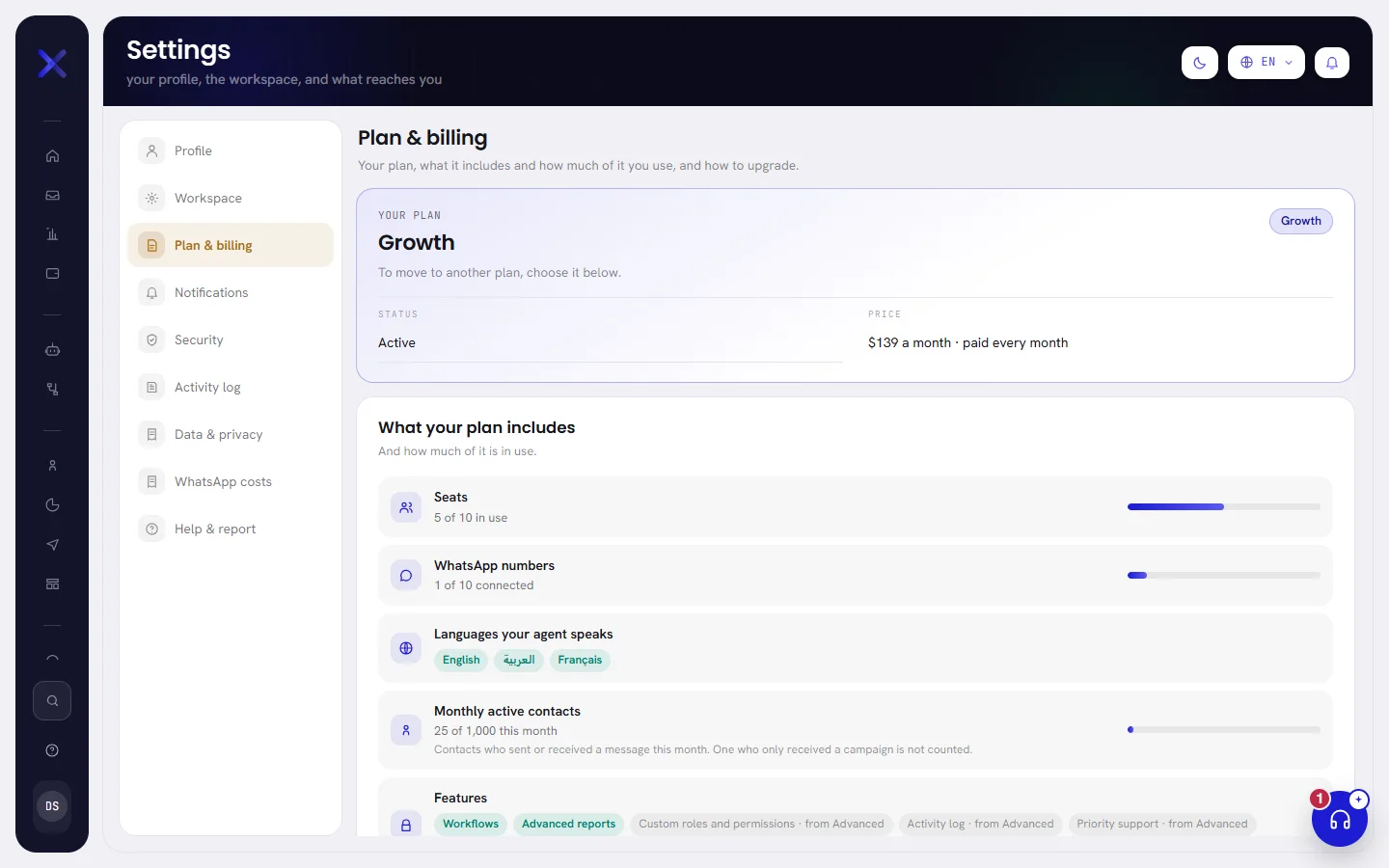
Three other ways lead to it:
- The badge under your workspace’s name, at the top of the menu.
- Plan & billing in your account menu, at the foot of the menu.
- The banner of a free trial, on every screen.
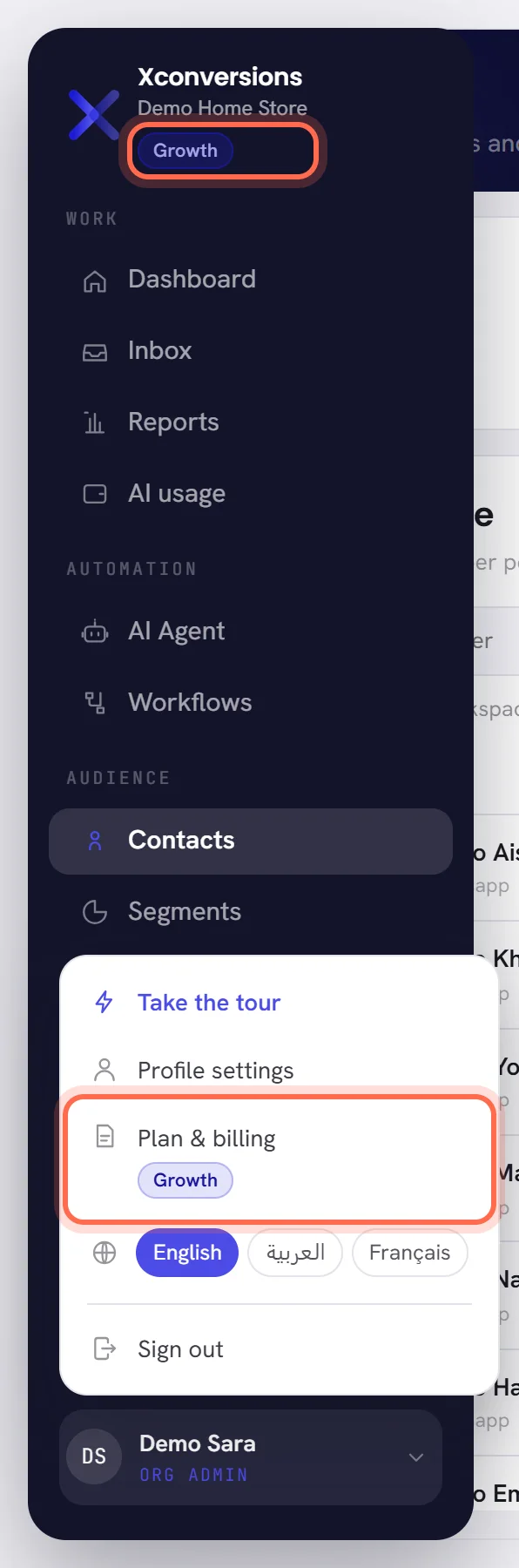
Everybody in the workspace can open the tab. Choosing a plan, asking for a setup package and seeing the AI wallet are for people whose access includes The workspace and billing.
Your plan
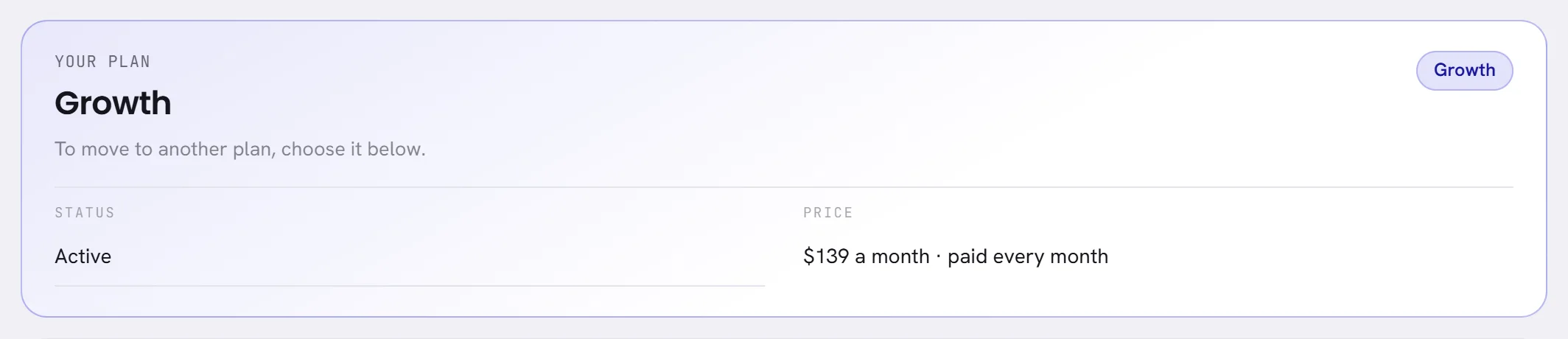
The first card says where the workspace stands, in the same words as the badge.
| On the screen | What it does |
|---|---|
| Your plan | The name of your plan. While you have none, it says Free trial or Trial ended. |
| Status | Where the plan stands, for example Active. After a trial has ended, it says that the workspace is paused and the AI is not answering. |
| Price | What a month of the plan costs, and whether it is paid every month or paid once a year. A plan agreed with us says Custom. |
| Last day of your trial | On a free trial: the last day of it. |
| Days left | On a free trial: how many days remain, today included. |
| Trial ended on | After a trial: the day it ended. |
| Choose a plan | On a free trial: takes you down to Plans. |
On a free trial, the card can also offer more days, once: see Ask for more days.
What your plan includes
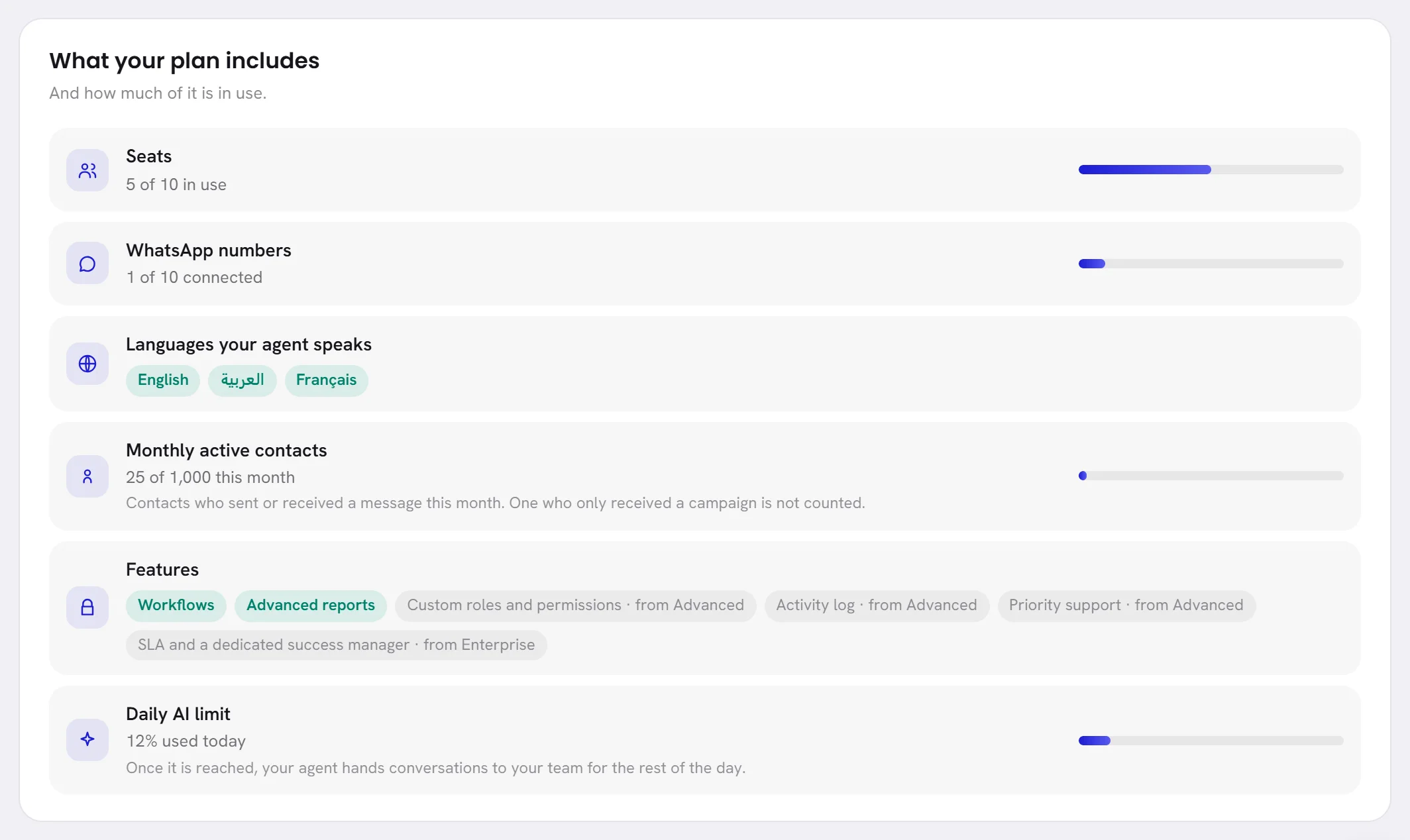
The card What your plan includes lists each limit of your plan, with how much of it is in use. On a free trial it lists what the trial includes.
| On the screen | What it does |
|---|---|
| Seats | How many people are in the workspace, of how many your plan allows. When users were added to your plan’s own, a line says how many. |
| WhatsApp numbers | How many numbers are connected. A plan with no limit on them says so; a plan with one says of how many. |
| Languages your agent speaks | The languages your agent may answer in. One that your plan does not include says so. |
| Monthly active contacts | How many contacts were active this month, of how many your plan includes. See below. |
| Features | The features that depend on the plan. The ones your plan opens are lit; each of the others names the plan it comes with. |
| Daily AI limit | How much of the day’s limit on AI your agent has used, as a percentage, or No daily limit. Once it is reached, your agent hands conversations to your team for the rest of the day. |
What happens at each limit is in Plan limits.
What a monthly active contact is
A plan is sized by monthly active contacts. A contact is active in a month when a message was exchanged with them in that month:
- They wrote to your number.
- Your agent, or somebody on your team, wrote to them.
- A workflow sent them a message.
A contact who only received a campaign is not counted. If they answer it, they are. Each contact counts once in a month, however many messages there were. The month is the calendar month on your workspace’s time zone.
Nothing stops when you pass the number your plan includes: every conversation is still answered. The card then says how many you are above it, and about what that comes to.
The AI wallet card
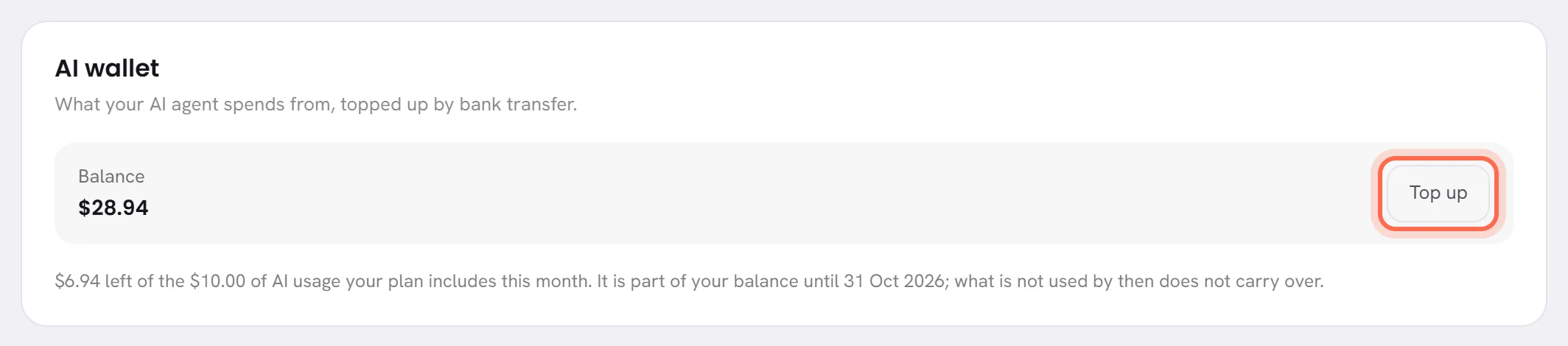
AI wallet is shown to the people who see money. It gives the Balance, rounded down to the cent, what is left of the AI usage your plan includes this month, and Top up, which opens the AI usage screen at the form to top up. See AI usage and the AI wallet.
Under them, Open the ledger leads to the ledger, where every charge and every payment is a line.
The plans
Plans lists the plans you can choose, side by side, at today’s prices. It comes straight after the first card while you are on a free trial, and last once you are on a plan.
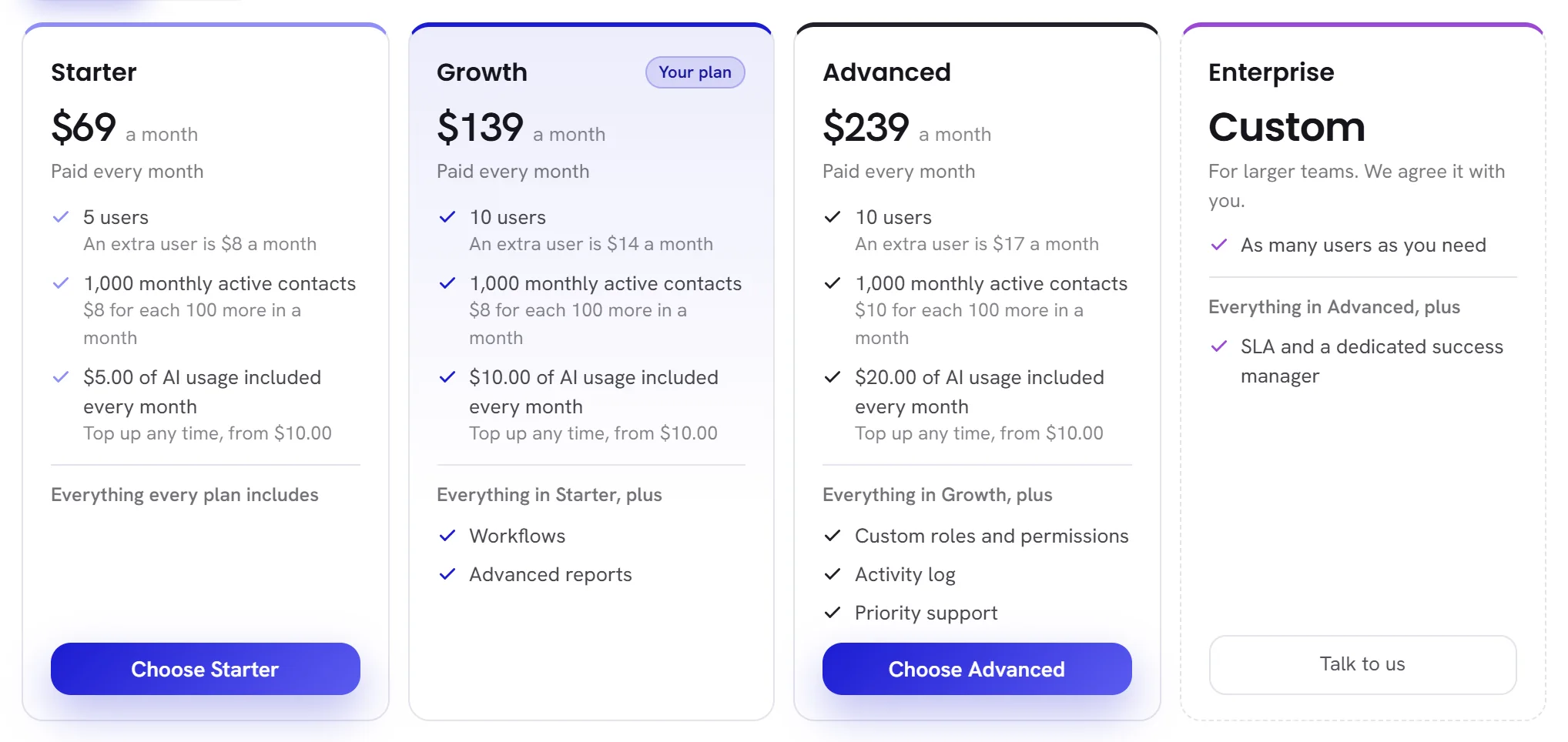
A plan’s card lists:
- Its name, and Your plan on the one you have.
- Its price a month, and how it is paid.
- Its users, and what one more user costs a month.
- Its monthly active contacts, and what each hundred more costs in a month.
- The AI usage it includes every month, and the smallest top-up.
- Its WhatsApp numbers and its agent’s languages, when the plans differ in them.
- The features it adds to the plan before it.
- The button to choose it.
| On the screen | What it does |
|---|---|
| Monthly | Shows each plan’s price when it is paid month by month. |
| Yearly | Shows each plan’s price a month when a year is paid at once, and the amount paid for the year. The switch is there when a plan has a yearly price. |
| More contacts? | The larger sizes some plans are sold in. Tick a number of monthly active contacts, and the table gives each plan’s price at that size. |
| Every plan includes | What no plan locks: AI sales agent on WhatsApp, Shared team inbox, Broadcast campaigns, Contact import, tags and segments, Message templates, Basic automations and Standard reports. |
| Custom | On the last card: a plan with no listed price, for larger teams. You ask, and we agree it with you. |
The features that depend on the plan are Workflows, Advanced reports, Custom roles and permissions, Activity log, Priority support and SLA and a dedicated success manager. Point at a feature on a card to read what it is.
To choose a plan, see Choose or change a plan.
Who bills you for what
| What | Who bills it | How it is paid | Where you see it |
|---|---|---|---|
| Your plan | We do. | By bank transfer, every month or once a year. | Plan & billing |
| Your agent’s AI usage | We do, from your AI wallet. | First with the AI usage your plan includes each month, then with what you top up by bank transfer. | AI usage: see AI usage and the AI wallet. |
| WhatsApp messages | Meta does, directly. | With the payment method on your WhatsApp Business account. We add nothing to Meta’s rates and charge nothing per number. | Meta’s own bill, and an estimate under WhatsApp costs in Settings: see What WhatsApp charges. |
| A setup package | We do, once. | As agreed with our team when you ask for it. | Setup packages |
The address to write to with a question about your plan or a transfer is at the foot of Plans. You can also ask in the Help panel: see Get help.