Find the reason first
xconversions always says why a message did not go. Where it says so depends on where the message came from.
| The message was | Where the reason is |
|---|---|
| A reply you typed in the Inbox | Refused before sending: a red line above the reply box, with your text still in the box. Failed after sending: not delivered under the message, with the reason under it. |
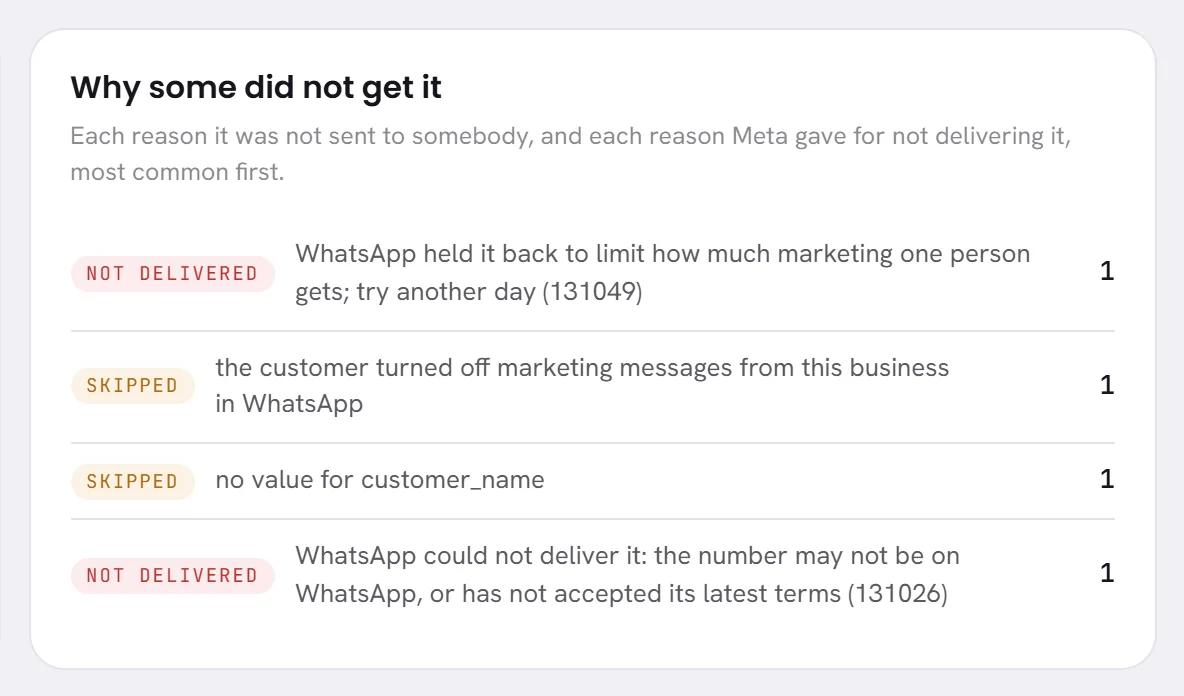
| A campaign’s message | On the campaign’s results page, under Why some did not get it, and per person in the Reason column. A draft that cannot be sent lists what is missing in the campaign window, under Not ready yet. |
| A reply of your AI agent | A notice across the conversation, such as AI paused: wallet empty. |
| Anything, when a number is the cause | A banner at the top of every screen, and the number’s card on Channels. |
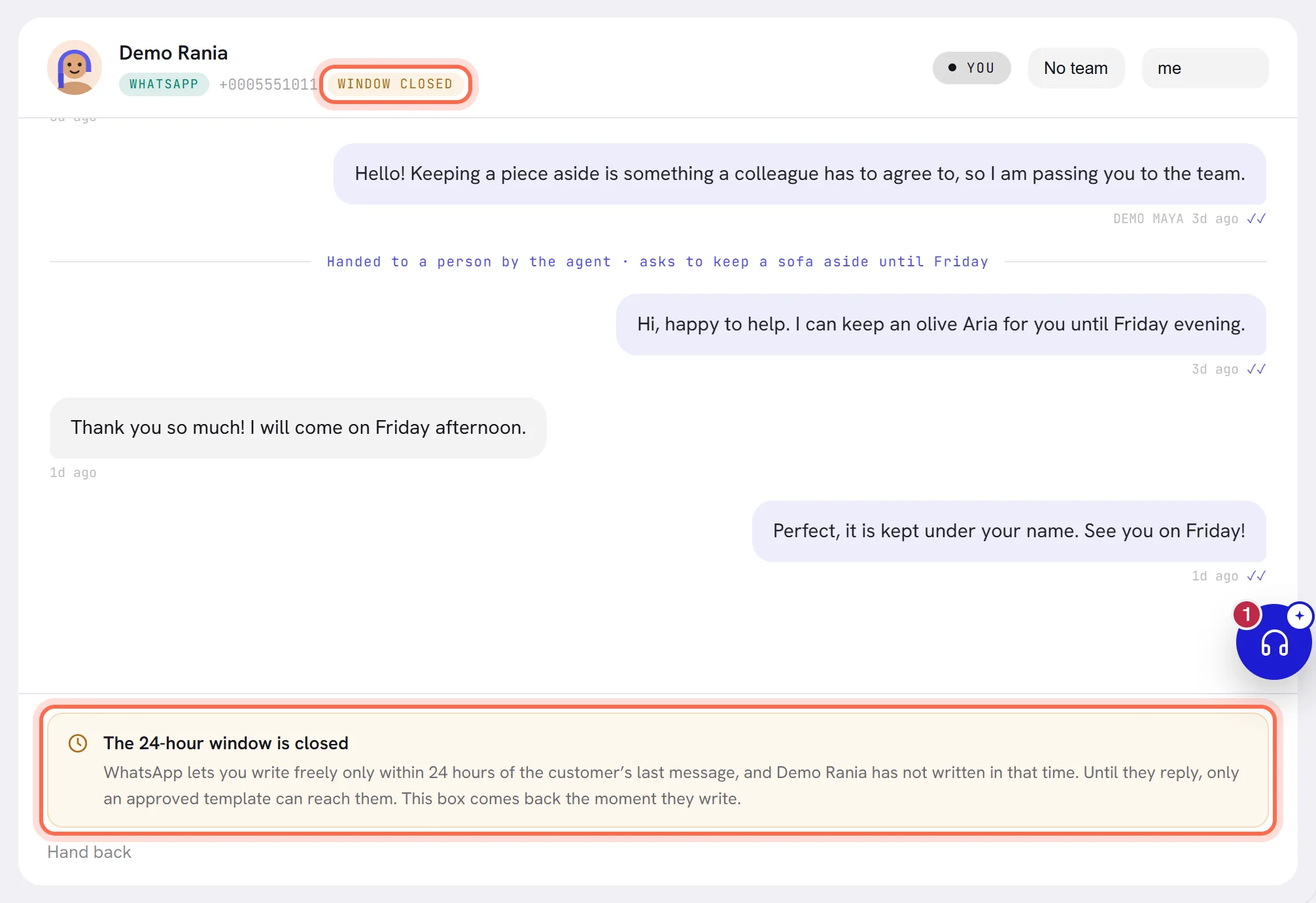
The 24-hour window is closed
WhatsApp lets a business write freely only during the 24 hours after the customer’s last message. After that, only an approved template can reach them: see The 24-hour window.
| What you see | Why | What to do |
|---|---|---|
| Window closed beside the customer’s number, and The 24-hour window is closed where the reply box was | The customer has not written for 24 hours, or never has: somebody a campaign reached, for example. | Wait for them to write: the box comes back at once. To write first, send an approved template with a campaign or a workflow. The inbox cannot send a template from a conversation. |
| Not sent: the 24-hour window is closed. Only an approved template can reach this customer until they write back. | The window closed while you were typing. | The same. |
the service window has closed or more than 24 hours since the customer last wrote, so only an approved template can go under a message | The window closed between the moment the message was written and the moment it was sent. | The same. |
The conversation is not yours to write in
A customer must never read two voices in one conversation, so only whoever holds it can write in it.
| What you see | Why | What to do |
|---|---|---|
| The AI agent is answering this conversation. Take it over first, then write. | The AI agent holds the conversation. | Press Take over, then write: see Assign and hand over. |
| Somebody else is handling this conversation. It has to be assigned to you before you can write in it. | A colleague holds it. | Have it assigned to you, or leave it to them. |
the thread changed hands before this could send under a message | The conversation changed hands between writing and sending. | Take it over again, and write the message again. |
The contact opted out, or never agreed
The reason reads the contact has opted out. It covers two cases.
- The customer asked you to stop. Nothing is ever sent to them again, by a person, the agent, a campaign or a workflow, and this cannot be undone from the contact. See Opt-in and opt-out.
- The contact is marked No consent: they were imported, added by hand without their agreement, or came from a phone’s address book. Messages to them are refused with the same words, and the AI agent does not answer them either. If they did agree, open the contact in Contacts, choose Edit contact and switch on They agreed to be messaged: see Consent and opt-outs.
A marketing template is also held back from somebody who turned off marketing from your business in WhatsApp’s own menu: the customer turned off marketing messages from this business in WhatsApp. Replies and utility templates still reach them.
The number cannot send
When the number is the cause, every message from it fails the same way. Open Channels and read the number’s status: When a number has a problem gives the way out for each.
| What you see under the message | Why | What to do |
|---|---|---|
no connected number to send from; connect one in Channels | No number of your workspace has the status Connected: none is connected, or yours is waiting for a payment method, has a payment problem or was disconnected. | Look at the status on Channels. |
WhatsApp could not charge this account, so its payment method needs attention | Meta has no card it can charge for this number’s messages. | Add a payment method at Meta. Replies already queued wait and go out by themselves. |
not sent: payment issue, the 24-hour window has closed | The reply waited for the card, and the customer’s 24 hours ran out meanwhile. | Wait for the customer to write, or send a template. |
this number is not allowed to send; reconnect it in Channels | The number’s WhatsApp access has ended or was withdrawn. | Reconnect a number. |
the number it would go from is disconnected; reconnect it in Channels | The number a campaign or a workflow sends from is no longer connected. The word after “is” is the number’s status. | Connect it again, or give the campaign another number. |
the number is not registered with WhatsApp yet or the number’s display name is not approved yet | Meta has not finished with the number or its name. | Wait, and check WhatsApp Manager for a message from Meta. |
WhatsApp is limiting this number because earlier messages were blocked or reported, Meta has restricted this number, Meta has locked this WhatsApp Business Account | Meta limited the number or the account after complaints or a policy problem. | Read Meta’s notice in WhatsApp Manager. See Messaging limits and quality. |
the WhatsApp connection is not set up on this platform; the administrators have been told | The fault is on our side. | Nothing: our team has been told. Write to us if it lasts. |
While a number has a payment problem, a campaign does not fail: each message waits and goes out when the card is fixed. One that waits more than six hours is marked not sent: sending was paused, and the campaign says 4 not sent: sending was paused. Send them again with Retry once messages go out. Workflows wait the same way.
The template cannot be sent
Only a template Meta has approved can be sent. Its status is written on its picture under Templates: see Template statuses.
| What you see | Why | What to do |
|---|---|---|
| Meta has not approved that template. in the campaign window | The template is a draft, still with Meta, rejected or paused. | Wait for Meta’s answer, or choose an approved template. For a rejected one: A template was rejected. |
the template is no longer approved, or the template is not approved followed by its status | Meta paused, disabled or rejected the template after the campaign was launched. | The people not reached are listed on the results page. Fix the template, then send to them again. |
Meta has paused this template because of low quality or Meta has disabled this template | Too many people blocked or reported it. | A template was rejected. |
this template needs an image or file and none was given, or This template was approved with an image or file header, and none has been chosen. | The template was approved with a picture, a video or a document at the top, and the campaign has no file for it. | Upload the file in the campaign window. |
no value for followed by a name, or A placeholder in the template has no value. | A blank of the template has nothing to fill it for this contact, or for anybody. | Fill every blank in the campaign window. A contact who lacks the value is skipped, never sent a sentence with a hole in it. |
the values do not match the template’s placeholders, a value does not fit the template’s format, the template is too long once the values are filled in | WhatsApp refused the template as it was filled in for this person. | Check the value this contact has for each blank: a very long name, or an empty one. |
the template does not exist in this language, or is not approved yet | WhatsApp does not hold an approved template of that name in that language. | Check its status under Templates. |
A campaign does not start, or misses people
| What you see | Why | What to do |
|---|---|---|
| Not ready yet in the campaign window, with a list | Something is missing: a template, an audience, a number, a value for a blank, a file. | Each line says what. Create a campaign goes through them. |
| Nobody in that audience may be messaged. | Nobody in the segment has agreed to be messaged. | Choose another segment, or record your contacts’ consent. |
| A free trial writes campaigns and sends them once a plan is active. Choose a plan to send this one. | Your workspace is on a free trial that does not send campaigns. | Choose a plan. |
| The campaign is sending and many people are still waiting | A campaign sends at its own speed, and holds its messages during quiet hours until they end. | Nothing: see Schedule and quiet hours. |
| Fewer people than the segment holds | Only contacts who can be messaged are counted, and the audience is fixed at launch. | The results page says who was skipped and why: see Campaign results. |
| Some messages are marked not delivered | WhatsApp refused them or could not deliver them. | Read the reasons, then use Try 4 again on the results page for the ones worth another go. People who opted out are never included. |
WhatsApp refused it or could not deliver it
| The reason reads | What it means | What to do |
|---|---|---|
WhatsApp could not deliver it: the number may not be on WhatsApp, or has not accepted its latest terms | The customer’s number cannot receive it. | Check the number. Nothing else can be done from here. |
WhatsApp held it back to limit how much marketing one person gets; try another day | WhatsApp limits how many marketing messages one person receives, from all businesses together. | Try another day. |
too many messages to this customer in a short time | Several messages went to the same person within moments. | Wait a little, then send again. |
WhatsApp could not process the attached file, WhatsApp does not support this kind of message | WhatsApp would not take the file. | Send it in another format, or smaller. |
something went wrong at WhatsApp, WhatsApp was too busy to take it, WhatsApp could not be reached | A passing fault at WhatsApp. | Send it again in a few minutes. |
WhatsApp never confirmed it went, so it was not sent again in case it did | The answer to the send was lost. xconversions does not send twice on a guess. | Ask the customer, or send it again yourself. |
it could not be sent after several tries | xconversions gave up after trying for half an hour. | Send it again. If it keeps failing, write to us. |
Three things are refused before anything is sent, with a line above the reply box: That message is longer than WhatsApp allows. (4,096 characters is the most), That file is too large to send. 16 MB is the limit. and WhatsApp will not carry that kind of file. The inbox sends pictures, PDF, Word and Excel files, MP4 video, and MP3 or OGG audio: see Reply to a customer.
The AI agent does not answer
When the agent steps back, it leaves a notice across the conversation saying why, and the conversation waits for a person.
| What you see | Why | What to do |
|---|---|---|
| The conversation is marked as held by a person, with Hand back under the reply box | Somebody took it over, it was assigned, or somebody answered from the phone on a number that stays on the WhatsApp Business app. The agent never writes in a conversation a person holds. | Press Hand back when the agent should answer again. |
A notice starting Escalated to a human or Handed to a person | The agent handed the conversation over: the customer asked for a person, the subject is one you told it to pass on, or it had no answer. | Answer the customer. To change what it hands over, see Agent profile and instructions. |
AI paused: wallet empty, and the banner AI replies are paused: your AI balance is used up. | Your AI balance is used up. This applies only where AI usage is paid from a wallet. | Top up your AI wallet. The agent answers again from the next message. |
AI paused: free trial ended, and the banner Your trial has ended, the AI is paused | The free trial is over and no plan is active. | Choose a plan. |
AI paused: turned off by our team | Our team switched the AI off for your workspace. | Write to us. |
Customer opted out — suppressed for this workspace | The customer asked to stop. The conversation is closed and nothing more is sent. | Nothing. |
| No notice, and no answer to anybody | No agent is live, or no number is connected. | Under AI Agent, the agent that answers is marked Live. If none is, press Set live on one: see Create an AI agent. |
| No notice, and no answer to one contact | The contact is marked No consent or Opted out. | See The contact opted out, or never agreed. |
The trial has ended
When a free trial ends without a plan, the workspace is paused. Every screen leads to Plan & billing, the AI agent does not answer, and campaigns and workflows wait. Nothing is lost: customers’ messages still arrive and are kept, and what was waiting goes out the moment a plan is active. See The free trial.
If none of this explains it
Press the round help button, Get help, in the corner of any screen, and tell us in the Help panel which conversation or campaign it is and the exact reason written under the message, with its code. See Get help.