The rule
Meta lets a business contact somebody on WhatsApp only if both of these are true: the person gave the business their phone number, and the person agreed to receive messages from it. That agreement is the opt-in.
It matters when you write first, with a template. A customer who writes to you can be answered inside the 24-hour window.
Choosing how to ask, and obeying the law of the country you sell in, is the business’s responsibility. It is not Meta’s, and it is not xconversions’.
What counts as an opt-in
Meta asks for three things:
- the person is clearly told that they are agreeing to receive messages;
- your business is named;
- you follow the law that applies to you.
The agreement does not have to mention WhatsApp by name. It works better when it says what you will send, such as order updates, offers or reminders, and how to stop. People who are surprised by a message block the sender.
A phone number on a list you bought, or collected for something else, is not an opt-in.
Collecting it and recording it
Ways to ask that Meta accepts, as long as the three points above are met: a tick-box on your website or order form, an SMS, a phone call, a paper form in the shop.
Keep the proof: when, where, and what the customer agreed to. Meta can look at how a business collects opt-ins when customers complain.
xconversions keeps one consent state for each contact, shown in the CONSENT column of Contacts:
| On the screen | What it does |
|---|---|
| CAN MESSAGE | They agreed. Campaigns and workflows send to them. |
| NO CONSENT | They have not agreed, as far as xconversions knows. Campaigns and workflows leave them out. |
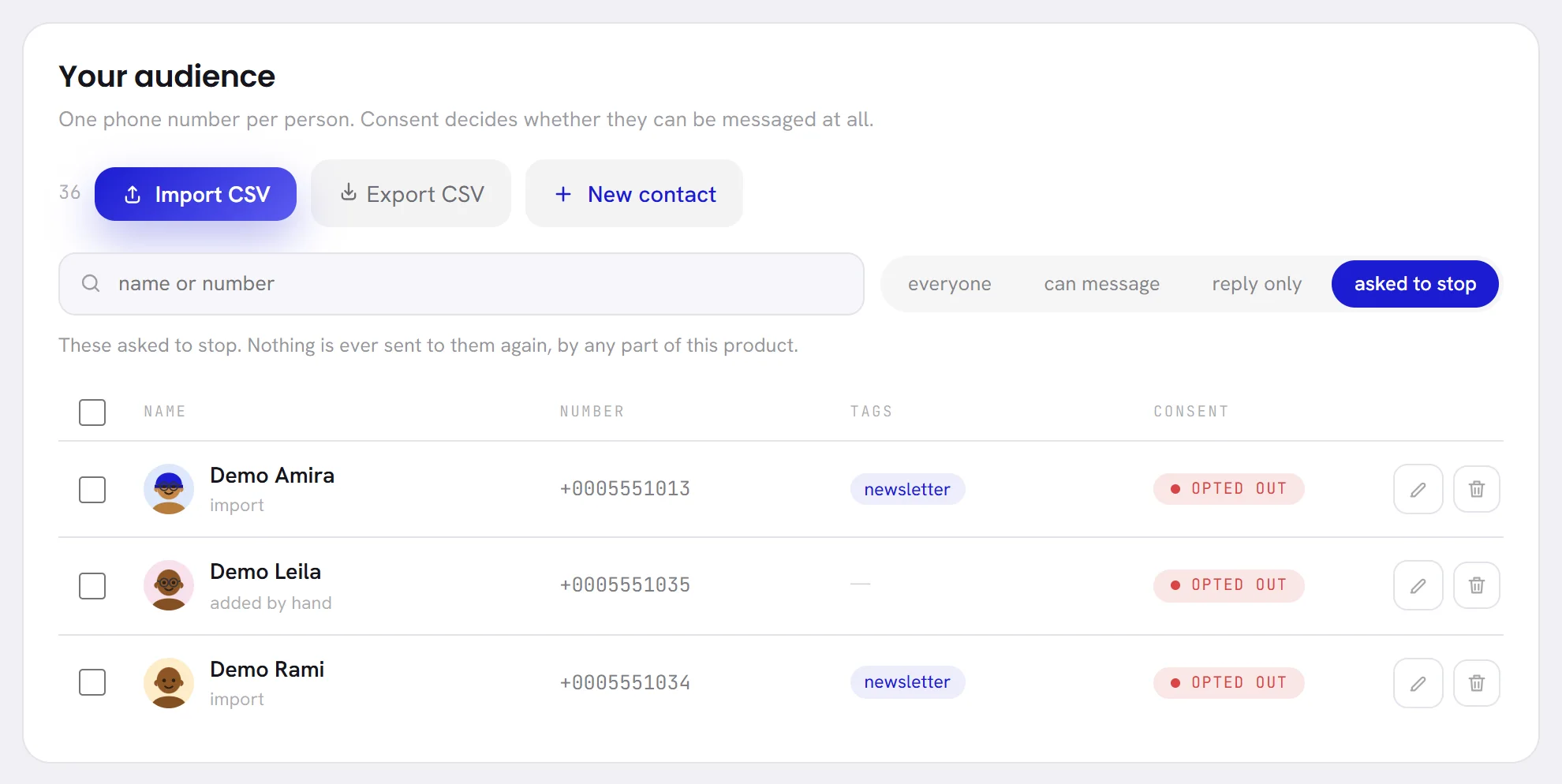
| OPTED OUT | They asked to stop. Nothing is sent to them again. |
How a contact gets its state:
| How the contact arrived | State |
|---|---|
| They wrote to your number first | CAN MESSAGE |
| You added them by hand | NO CONSENT, unless you tick They agreed to be messaged |
| You imported them from a file | NO CONSENT. An import never grants consent, and never changes the consent of a contact you already had. |
To record consent that a customer gave you elsewhere, open the contact and tick They agreed to be messaged. Tick it only when they really said yes. Consent and opt-outs shows the screens.
How a customer opts out
A customer has four ways to say stop. xconversions hears two of them.
| What the customer does | What xconversions does |
|---|---|
| Sends a stop word as their whole message | Marks them OPTED OUT, takes them out of every workflow, closes the conversation, and sends no reply. |
| Turns off marketing from your business in WhatsApp’s settings | Records it and stops sending them marketing templates. Replies and utility templates still go. If they turn it back on, marketing resumes. |
| Blocks your number | Nothing: xconversions is not told. Meta counts the block against your quality rating. |
| Reports your business to WhatsApp | Nothing: xconversions is not told. Meta counts it against your quality rating and may review your account. |
The stop words xconversions recognises:
| Language | Words |
|---|---|
| English | stop, unsubscribe, cancel, quit, end, optout, opt out, remove me |
| Arabic | توقف, إيقاف, إلغاء, إلغاء الاشتراك, لا أريد, written with or without the hamza |
| French | stop, arrêt or arret, annuler, désabonner or desabonner, me desabonner |
| Spanish | baja, dar de baja or darme de baja, cancelar, cancelar suscripción or cancelar suscripcion, desuscribir or desuscribirme, parar, basta, no más mensajes or no mas mensajes, no me escriban más or no me escriban mas |
The word has to be the whole message. Capitals, punctuation and emoji are ignored, so STOP! counts. “Please stop by tomorrow” does not, and neither does “stop sending me this”: a longer message is read by your agent or your team like any other.
When a customer asks to stop in other words, untick They agreed to be messaged on the contact, and campaigns and workflows no longer reach them.
An opt-out cannot be undone
Once a contact is OPTED OUT, no screen in xconversions reverses it. The contact’s edit window gives the date they asked to stop and says that it cannot be undone there. Importing the contact again does not restore consent, and neither does adding them to a segment.
Every send checks consent again at the moment it leaves, so a customer who sends STOP in the middle of a campaign is skipped by the rest of it.
The policies behind this
The WhatsApp Business Messaging Policy says who you may message, requires opt-in and respect for opt-outs, lists the kinds of business and goods that may not use WhatsApp, and requires any automation to offer a way to reach a person. Its section on commerce, together with Meta’s Commerce Policy, covers what may be sold through WhatsApp.
What breaking the rules costs
Meta does not check opt-ins in advance. It watches how customers react, and acts on that.
- Blocks and reports lower your quality rating. Templates get paused and your messaging limit stops growing.
- If quality stays low, Meta limits how fast the number can send.
- For policy violations, Meta first warns. Then it blocks templates for 1 or 3 days, then all messages for 5, 7 or 30 days, then locks the account until an appeal, and in the end disables it for good. An account that causes serious harm is removed at once.
Warnings and restrictions are listed in Business Support Home in Meta Business Suite, with the way to appeal. Open Business Support Home.
Questions
Do I need an opt-in to answer somebody who wrote to me?
No. You can answer inside the 24-hour window. xconversions marks a customer who writes first as CAN MESSAGE; whether that is enough to send them offers later is for you to judge under your own law. Asking in the conversation is the safe way.
I bought a list of numbers. Can I import it and send a campaign?
No. People on a bought list have not agreed to hear from you. Imported contacts arrive as NO CONSENT, and campaigns leave them out.
Does “stop” inside a sentence opt a customer out?
No. Only a message that is nothing but a stop word does.
A customer who opted out wants to hear from us again. What can I do?
No screen reverses an opt-out, and xconversions keeps their conversation closed even when they write. Write to support.
Does xconversions add an unsubscribe line to my templates?
To marketing templates, when you leave the footer empty. Utility templates are left as you wrote them.