Why templates exist
A template is a message written in advance and approved by Meta. It is the only kind of message you can send a customer outside the 24-hour window. Every template has a name, a language and a category, and the category decides both what it may say and what it costs.
The three categories
| Category | What it is for | Examples |
|---|---|---|
| Marketing | Anything that promotes: offers, news, invitations, reminders to come back. Also anything mixed or unclear. | A discount code, a new collection, a basket left unpaid, a renewal offer, a birthday greeting. |
| Utility | A message with no promotion in it, about something this customer did or asked for, or something they must know. | An order confirmation, a delivery update, an appointment reminder, a receipt, a question about one specific order. |
| Authentication | A one-time code that proves who somebody is. Meta writes the words. | A login or verification code. |
Two rules settle most cases. A utility message with one promotional line in it is marketing. And only an authentication template may carry a one-time code.
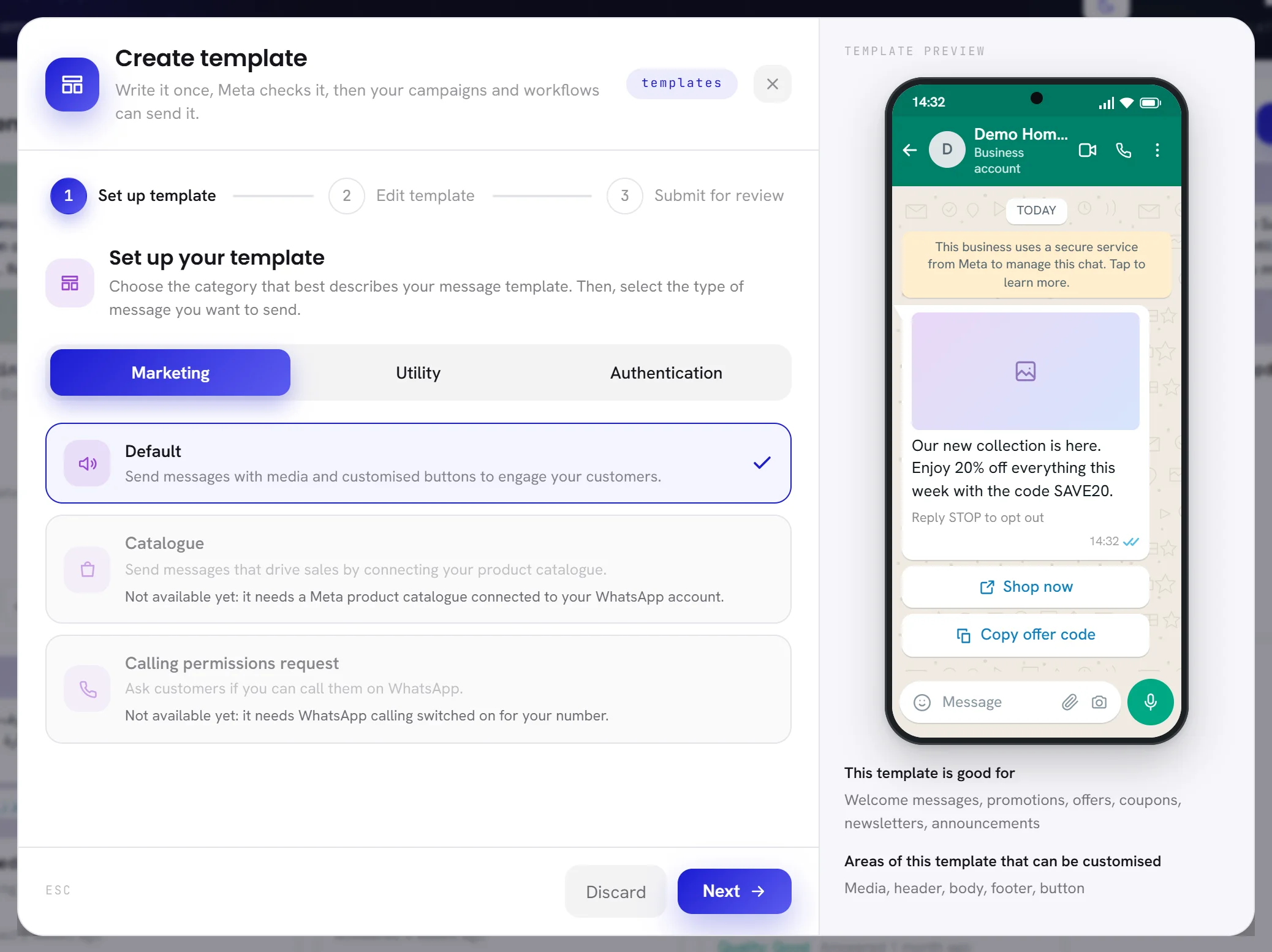
In xconversions, Create template offers all three. Campaigns and workflows are made to send marketing and utility templates. xconversions does not generate or send one-time codes: an authentication template can be written and reviewed here, but a campaign or a workflow has no code to put in it.
Meta can change the category
You choose the category, and Meta checks it against the words.
- At review, a template submitted as utility that reads as marketing is approved as marketing, not rejected.
- After approval, Meta keeps checking templates in use. One that should be marketing is moved there, normally with a day’s notice by email, and without notice for a business Meta has already warned.
- A marketing or utility template that carries a one-time code is rejected.
xconversions shows a move on the template’s card: Meta moved this from Utility to Marketing. From then on each send is charged as marketing. If you think Meta is wrong, you can ask for a review within 60 days, in WhatsApp Manager.
A business that keeps filing marketing as utility is first warned. Meta then caps how many utility templates it can send, and can move all its utility templates to marketing for a time.
The review
When you choose Submit for review, the template goes to Meta. Automated checks and people look at the words, the sample values and any media. Meta says a decision can take up to 24 hours; it often comes within minutes.
The answer appears on Templates and on the bell: approved, or rejected with Meta’s reason and, when Meta gives one, a line that starts Meta suggests.
What most often gets a template rejected:
- It starts or ends with a variable.
- It has too many variables for the amount of text.
- A variable has no sample value. Meta does not review a template without one.
- It asks for a sensitive identifier: a full card number, a bank account number, a national ID number.
- It threatens the customer, for example with legal action or public shaming.
- It offers goods or services that Meta’s policies do not allow on WhatsApp.
- Its body and footer are word for word the same as another of your templates.
- The category does not fit the words.
xconversions stops some of these before the template leaves. It does not submit a message that starts or ends with a variable, has two variables side by side, or lacks a sample value, the media sample or part of a button. The last step of Create template lists what it checked, under Before Meta looks at it.
A rejected template can be edited and submitted again. Changing an approved one sends it back to Meta, and it stops sending until they answer. Meta allows one edit a day, and ten in 30 days, on an approved template.
Statuses
Only an approved template can be chosen for a campaign or a workflow.
| On the screen | What it does |
|---|---|
| DRAFT | Written in xconversions and not sent to Meta yet. You can change it freely. |
| PENDING | With Meta for review. It cannot be edited until they answer. |
| APPROVED | Ready. Campaigns and workflows can send it. |
| REJECTED | Refused, with Meta’s reason on the card. Edit it and submit it again. |
| PAUSED | Stopped by Meta because customers reacted badly. Most pauses last a few hours and end by themselves. |
| DISABLED | Stopped by Meta after repeated poor quality. It does not come back, and it cannot be edited or deleted here. Write a new one. |
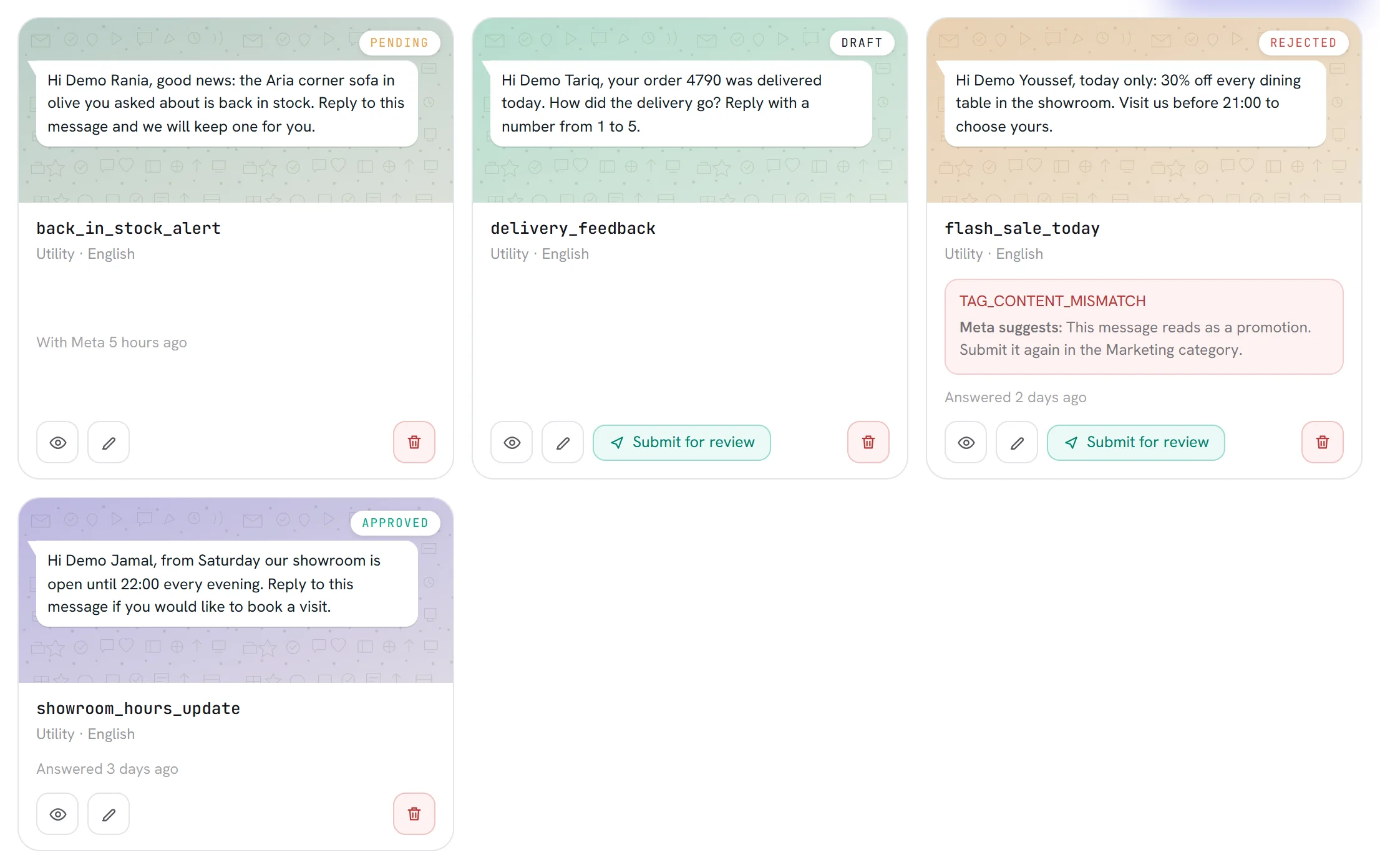
Template statuses covers the rarer ones as well.
Quality, pausing and pacing
Once a template is in use, Meta rates it from how customers react: whether they read it, block you or report you. On each card xconversions shows Quality as Good, Slipping or Poor, once Meta has said something.
When a template falls to the lowest rating, Meta pauses it: for 3 hours the first time, 6 hours the second, and the third time it is disabled. A paused template is refused, and the refused attempts are not charged. A campaign that uses it shows each refusal with its reason.
Meta may also hold back part of a large send of a new or recently paused template until the first customers have reacted. If they react well, the rest goes out. If they react badly, the rest is dropped and the template is paused. Meta calls this template pacing. A template paused this way does not come back by itself: you unpause it in WhatsApp Manager, under Manage templates.
A marketing message may not be delivered
Approval and consent do not guarantee that a marketing template arrives.
- WhatsApp limits how many marketing templates one person receives from all businesses in a period, and lowers that for people who rarely read them. A message held back this way fails with the reason “WhatsApp held it back to limit how much marketing one person gets; try another day”. Wait at least 24 hours before sending it to that person again.
- A customer can turn off marketing from your business in WhatsApp’s own settings. xconversions records it and skips that customer for marketing templates. Replies and utility templates still reach them.
- WhatsApp does not currently deliver marketing templates to phone numbers in the United States.
A message that is not delivered is not charged.
Languages and limits
A template is written in one language, and Meta does not translate it. The same name can exist in several languages; each one is reviewed on its own. Create template offers English, Arabic and French.
Meta allows 250 templates on an account until the business is verified, and up to 6,000 once it is verified and a display name is approved. Each language of a template counts as one. The top of Templates shows how many you have used.
Questions
Can I change the category of an approved template?
No. Meta does not allow it. Write a new template in the right category.
Can I reuse the name of a template I deleted?
Not for 30 days if it was approved. Meta holds the name for that long, and xconversions tells you the date it comes free.
Meta rejected my template and I do not understand why. What now?
Read Meta’s reason and the Meta suggests line on the card, compare the template with the list above, and see Template rejected.
Does a template expire?
Meta archives a template that has not been sent or edited for 12 months, and deletes it 28 days later unless it is unarchived at Meta in that time.