Two bills, from two companies
| From Meta | From xconversions | |
|---|---|---|
| For what | The WhatsApp messages your number sends. | Your plan, and what your AI agent uses. |
| Where you see it | WhatsApp Manager, and your invoices at Meta. | Plan & billing and AI usage. |
Meta takes its charges from the payment method on your WhatsApp Business Account. xconversions adds nothing to them, never sees your card, and is not charged for what you send.
What Meta charges for
Meta charges per message, only for messages from you to a customer, and only when the message is delivered. These are the rules in force since 1 October 2026.
| Message | Charged? |
|---|---|
| Anything a customer sends you | Never. |
| A marketing template | Always. |
| A utility template | Always, including inside the 24-hour window. |
| An authentication template | Always. |
| A reply in your own words inside the 24-hour window, written by a person or by your AI agent. Meta calls it a service message. | The first 1,000 delivered in a calendar month on each phone number are free. After that, each one is charged at the rate of a utility message. |
| Any of the above, to a customer who wrote to you from an ad that clicks to WhatsApp | Free while the free window is open: up to 7 days from your first reply, if you replied within 24 hours. |
| A reply typed in the WhatsApp Business app, on a number you share with it | Free. |
| A message that was not delivered | Not charged. |
Unused free replies do not carry over to the next month.
What a message costs
Meta publishes a rate for every combination of category and market. The market is the country or region of the customer’s phone number, not yours. This article does not repeat the rates, because Meta changes them: it may do so on the first day of any quarter.
- Meta’s pricing page shows the rates by country.
- Meta’s pricing documentation has the full rate cards, in each currency Meta bills in, and the rules above.
Three things hold in every market:
- Marketing has its own rate, usually higher than utility.
- Utility, authentication and service messages share one rate in each market.
- Utility and authentication get cheaper as your monthly volume in a market grows. Meta applies these volume tiers by itself, across all the accounts of your business, and starts again each month. Marketing and service messages have no volume discount.
Your account is billed in the currency chosen when it was created at Meta.
The payment method
Meta charges a payment method attached to your WhatsApp Business Account; on Meta’s newer screens, to the Messaging account. A card that is only on the business portfolio, or on an ad account, is not enough.
Without one, Meta does not deliver charged messages, and xconversions sends nothing from the number. On Channels the number shows NEEDS A CARD, with a panel titled One step left: a payment method. It lists the steps and has two buttons: Open WhatsApp Manager, and Help me do it to ask us to walk you through it.
If Meta later fails to charge the account, usually because a card expired or reached its limit, the number changes to PAYMENT PROBLEM and the panel reads WhatsApp could not charge this account. Messages already queued wait instead of failing, and go out when the payment method is fixed. A reply that is still waiting when its 24-hour window closes is not sent. A banner on every screen says the number cannot send until then.
The steps are in Add a payment method at Meta.
Estimating a month
Settings has a calculator under WhatsApp costs. Open the calculator.
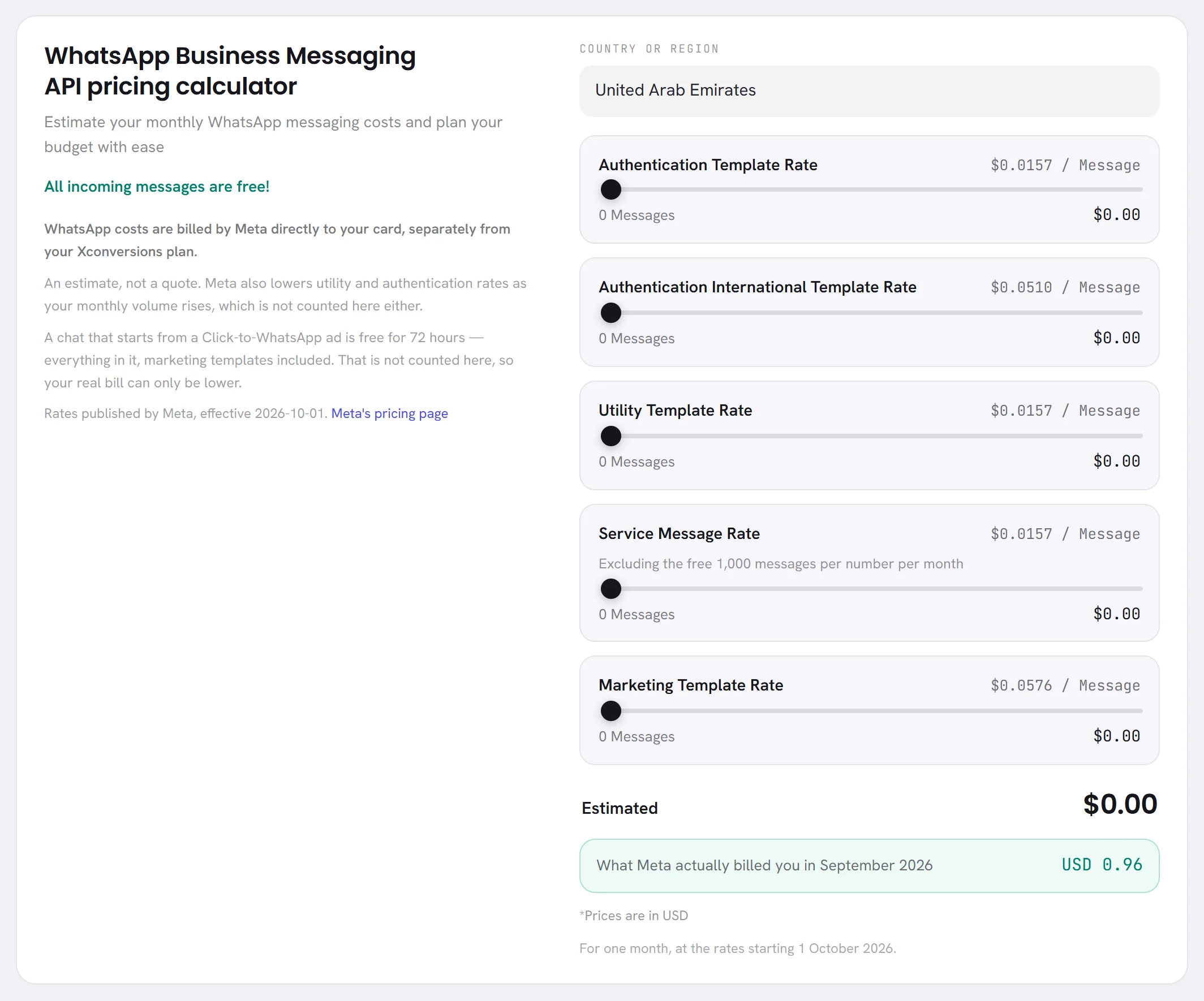
| On the screen | What it does |
|---|---|
| COUNTRY OR REGION | The market your customers’ numbers are in. One market at a time. |
| Authentication Template Rate | One-time codes in a month. xconversions does not send these: leave it at zero. |
| Authentication International Template Rate | Shown only in the markets where Meta has this rate. Leave it at zero. |
| Utility Template Rate | Slide to the number of utility templates you expect to send in a month. The row shows Meta’s rate for one message, and what the month comes to. |
| Service Message Rate | The same, for replies inside the 24-hour window, your AI agent’s included. The first 1,000 are taken off. |
| Marketing Template Rate | The same, for marketing templates. |
| Estimated | The total for the month. |
What it leaves out, on purpose: the volume discounts on utility and authentication, and the free window after an ad. Both only lower the real bill. It also counts the 1,000 free replies once, as for one number, and it shows Meta’s rates in US dollars or UAE dirhams only: dirhams for a workspace that sells in dirhams, dollars for every other.
When Meta has reported what you spent last month, the calculator shows that figure under the estimate. The WhatsApp cost calculator goes through the screen.
Seeing what you were really charged
| Where | What it shows |
|---|---|
| WhatsApp Manager, Insights | Meta’s own count of paid and free messages, and approximate charges. Open WhatsApp Manager. |
| Billing & payments at Meta | Your payment method, your payments and your invoices. Open Billing & payments. |
| Reports, under Overview | A panel titled What WhatsApp cost: the total for the period, how many messages were free or not priced yet, and a line for each category. It is marked ESTIMATE until Meta’s own figures arrive. |
| A campaign’s page | Meta charged: what that campaign’s messages cost. |
Your invoice from Meta is the one that counts. The figures in xconversions are a reading of it.
Keeping the bill down
- Answer in your own words while the window is open. Replies have a free allowance; a template sent inside the window has none.
- Say it in one message. Every delivered message counts, so three short replies use three of the free 1,000, or cost three times once those are used up.
- Send marketing to the people likely to want it. A segment of recent buyers costs less than the whole list, and gets fewer blocks.
- Keep utility templates free of promotion, so that Meta does not move them to marketing.
- If you advertise, use ads that click to WhatsApp and answer within 24 hours. That chat is then free for up to 7 days.
- Compare Reports each month with what you expected.
Questions
Does xconversions add a margin to Meta’s prices?
No. Meta bills you directly, and xconversions adds nothing to it.
Am I charged when a customer writes to me?
No. Messages from customers are free.
Does Meta charge for my AI agent’s replies?
They are service messages, like a person’s replies: free up to 1,000 a month on each number, charged after that. What the agent uses at xconversions is separate, under AI usage.
Is the free allowance for the workspace or for each number?
For each phone number, each calendar month. It starts again on the first of the month, in your account’s time zone.
Am I charged for a message that failed?
No. Meta charges only for delivered messages.
Which country’s rate do I pay?
The rate of the market the customer’s number belongs to, whatever country your business is in.