The Delivery tab
Open Reports and choose Delivery. Its first panel, What became of what we sent, takes every message written on your side in the period and puts it under what has become of it since.
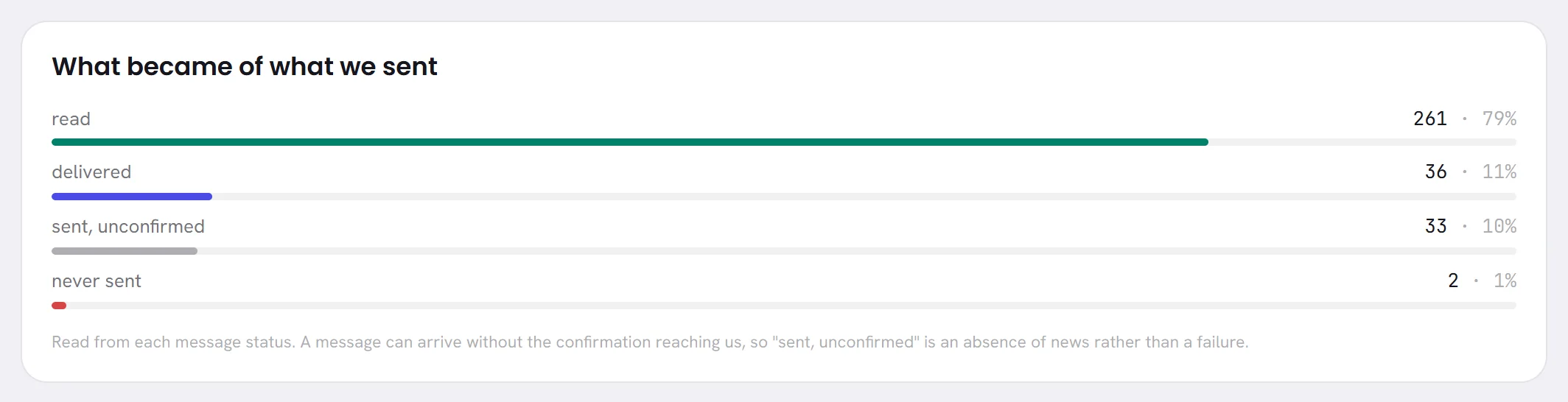
| On the screen | What it does |
|---|---|
| read | The customer opened the message. |
| delivered | The message arrived on the customer’s phone and has not been reported as read. |
| sent, unconfirmed | WhatsApp accepted the message and nothing has been heard since. The panel’s own note calls it an absence of news rather than a failure. |
| still queued | The message is written and WhatsApp has not taken it yet: it is on its way, or it is held because your number cannot send. |
| never sent | The message did not go: one of the app’s checks stopped it, WhatsApp refused it, or WhatsApp reported afterwards that it could not deliver it. |
Each line has its number, its share of all the messages of the period, and a bar. A line with nothing in it is not shown.
How delivery is counted
- A message is counted once, where it stands now: one that was read is under read, not under delivered as well.
- A message counts in every period that covers the day it was written. One written last week and read today is under read.
- The lines add up to We wrote on the Overview tab: replies from your AI agent and from your team, templates, campaign messages, and the notices the app writes into a conversation.
What moves the delivery figures
- read depends on your customers. WhatsApp reports a read only for people who keep read receipts switched on, so a low share of read beside a high share of delivered is not a fault.
- sent, unconfirmed is where a message waits between leaving and arriving, and some never get a confirmation. The notices the app writes for your team, for example when the agent hands a conversation to a person, never go to WhatsApp, so they stay on this line.
- still queued should be small and short-lived. If it grows, look for the banner saying that your number cannot send.
- never sent is the line to act on. The panel under it says why.
Under the bars, Why messages did not send lists the reasons for the last line. It is explained in Consent and refusals.
The Replies tab
Choose Replies. The panel How long people waited takes every message a customer sent in the period and measures how long it was before the next message from your side in that conversation.
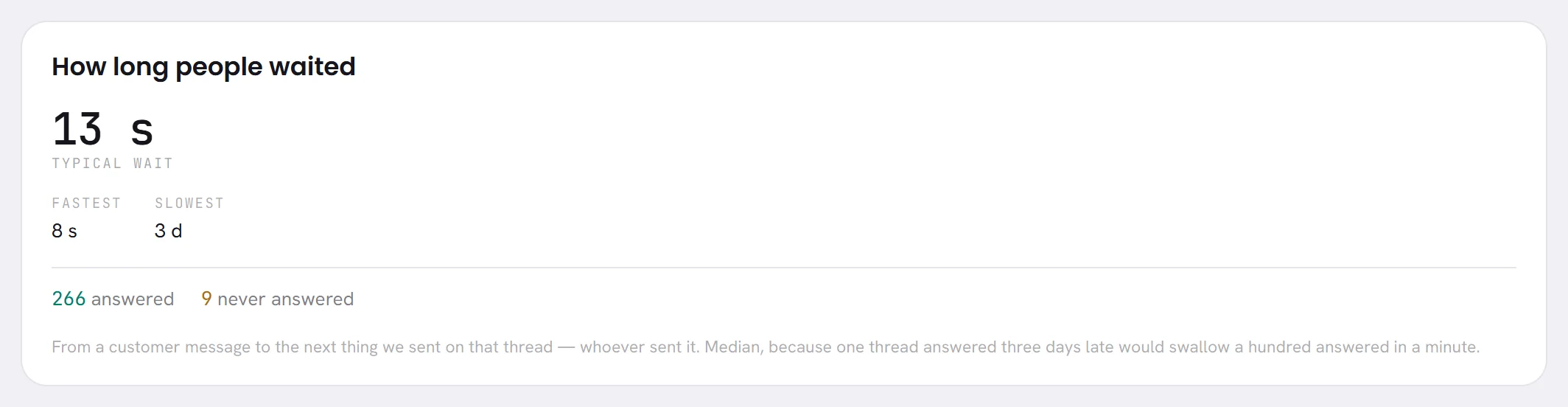
| On the screen | What it does |
|---|---|
| Typical wait | The middle value of all those waits: half of your customers’ messages were answered faster, half slower. |
| Fastest | The shortest wait of the period. |
| Slowest | The longest wait that did end in an answer. |
| answered | How many customer messages were followed by a message from your side. |
| never answered | How many were not, so far. A message that arrived a minute ago and is still waiting is counted here. |
Waits are written short, as 13 s, 9 min, 3 h or 3 d. While nothing has been answered, the figures read no data yet.
How the wait is counted
- It is counted for each message, not for each conversation. Three messages in a row answered by one reply are three waits.
- The answer can come from anybody on your side: your AI agent, a person, or a template sent by a workflow or a campaign. A notice the app writes into the conversation, for example when the agent hands it to a person, also ends the wait.
- The clock runs day and night. It does not stop outside your opening hours.
- It is the middle value and not the average, so one conversation answered three days late does not hide a hundred answered within a minute.
- Past 5,000 customer messages in the period, only the most recent 5,000 are measured, and the panel says so.
What moves the reply figures
- An AI agent that answers at once keeps the typical wait at a few seconds. A long typical wait usually means conversations waiting for a person: see Assign and hand over.
- never answered is the figure to look at first. A short typical wait beside many unanswered messages means the easy ones are answered and the others are not.
- Slowest is often one conversation. Find it in the inbox rather than worrying about the figure.
- The Desks tab gives the same figures for each team: see Desk and campaign reports.
Good to know
- Both tabs are in every plan, and open for anybody whose access includes Reports.
- The figure at the top right of the screen, Seconds to first reply, is the typical wait of the last 30 days in seconds, whatever period is chosen below it.
- Both tabs follow the period chosen at the top right: see Reports overview.
Questions
A customer ended with “thank you” and nobody wrote after that. Is it counted as never answered?
Yes. Every customer message with nothing after it from your side is counted, including the last word of a conversation that went well. The figure is therefore never zero for long; watch whether it grows.
Why is sent, unconfirmed never empty?
Some confirmations never come, and the notices the app writes into conversations for your team stay on that line because they are not sent to WhatsApp at all.
Does a campaign count as an answer?
Yes. Any message from your side that comes after a customer’s message ends that wait, a campaign’s template included.