Open the results page
Press the chart, Analytics, on the card of any campaign that has been launched. A draft has no chart: it has not gone to anybody yet.
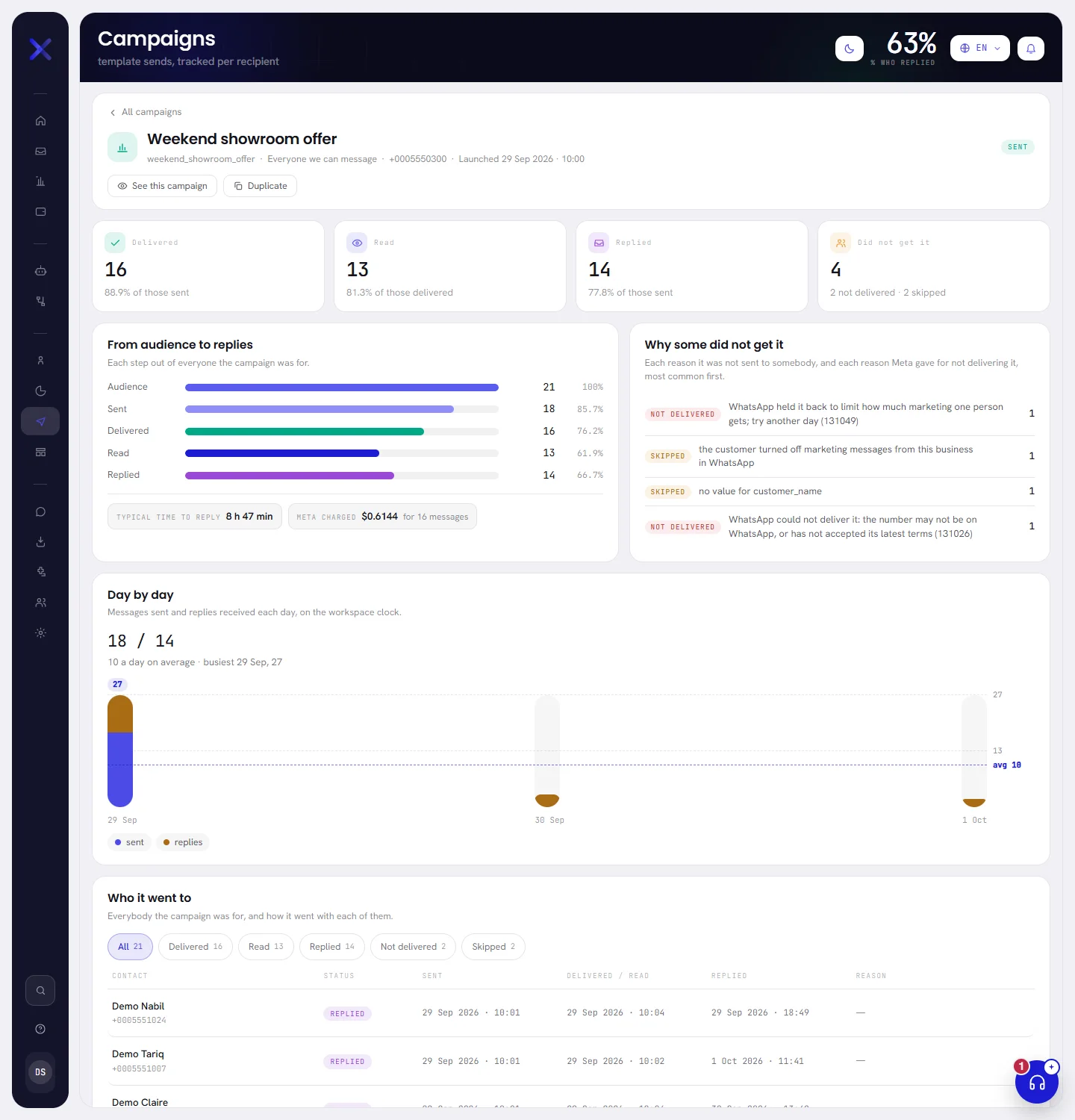
The top of the page says which campaign this is: its name, its template, its segment, the number it sent from, when it was launched, as Launched 29 Sep 2026 · 10:00, and its status.
| On the screen | What it does |
|---|---|
| All campaigns | Goes back to the Campaigns screen. |
| See this campaign | Opens the campaign’s window, where the pause, resume, retry and remove buttons are. |
| Duplicate | Makes a new draft from this campaign and opens it for editing. |
The page shows the figures as they were when it opened. Reload it to see newer ones.
Sent, delivered, read, replied
Four words are used all over the page, and they are four different things.
| Word | What it means |
|---|---|
| Sent | WhatsApp accepted the message. It may not have arrived. |
| Delivered | WhatsApp confirmed that the message arrived on the customer’s phone. |
| Read | The customer opened it. WhatsApp only reports this for people who keep read receipts switched on, so the real figure can be higher. |
| Replied | The customer wrote back within three days of the campaign’s message, while it was still the last thing you had sent them. Each person counts once. |
The four figures
| On the screen | What it does |
|---|---|
| Delivered | How many messages arrived, and under it their share of those sent. |
| Read | How many were opened, and their share of those delivered. |
| Replied | How many people wrote back, and their share of those sent. |
| Did not get it | How many people the campaign was for and did not reach, with the two kinds under it: not delivered, and skipped. |
Each percentage is a share of the step before it, so the three tiles do not have the same base. A dash stands for a percentage that has nothing to be a share of yet.
From audience to replies
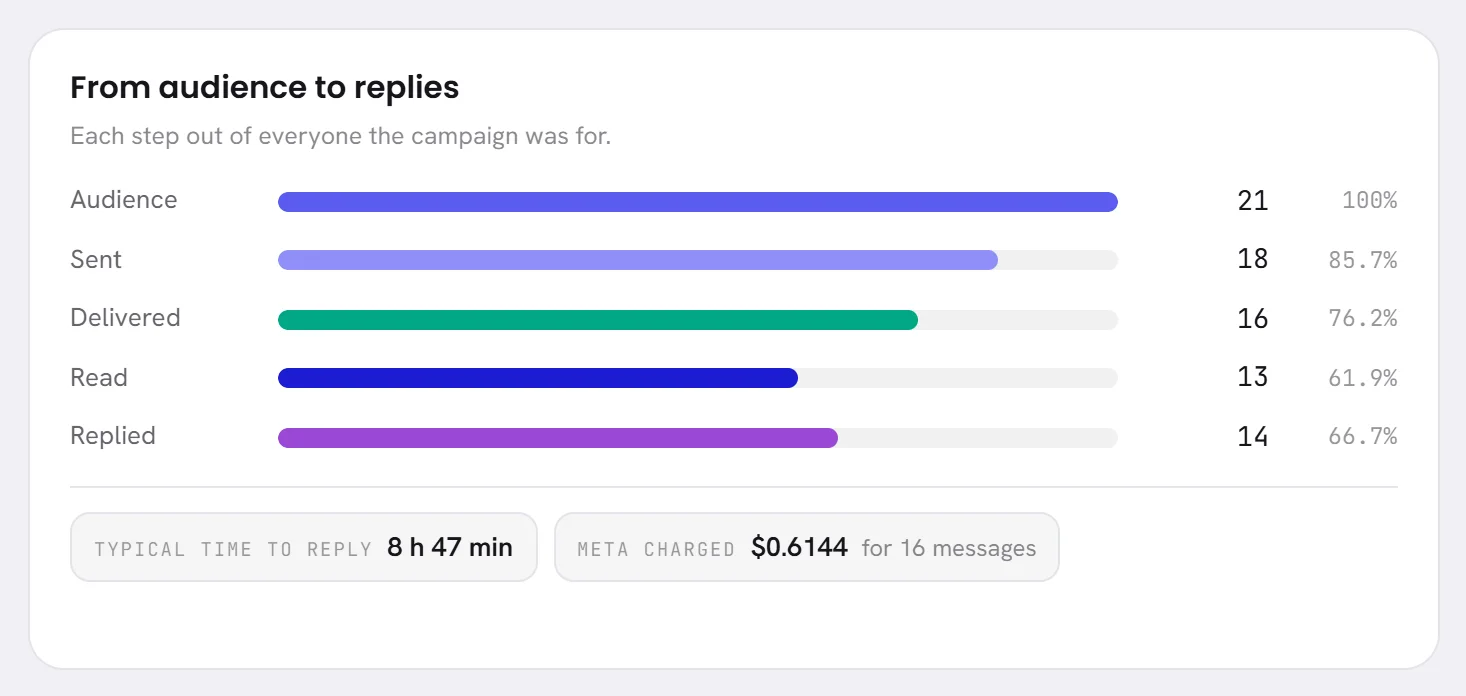
The bars under From audience to replies show the same campaign another way: every step as a share of everybody the campaign was for.
| On the screen | What it does |
|---|---|
| Audience | Everybody the campaign was for: the people fixed at launch. Always 100%. |
| Sent | Messages WhatsApp accepted. |
| Delivered | Messages that arrived. |
| Read | Messages that were opened. |
| Replied | People who wrote back. |
This is why one figure can carry two percentages on the same page. Thirteen replies to 18 messages sent, from an audience of 21, read 72.2% on the tile and 61.9% on the bar.
Under the bars:
| On the screen | What it does |
|---|---|
| Typical time to reply | How long people took to write back. It is the middle value: half of them answered faster, half slower. It reads no replies yet until somebody does. |
| Meta charged | What this campaign’s messages cost as far as it is known, and for how many messages. It appears once at least one message has a price, and only while every price is in the same currency. Your invoice from Meta is the figure that counts: see What WhatsApp charges. |
| Still waiting to send | People not written to yet. Shown while there are any. |
Why some did not get it
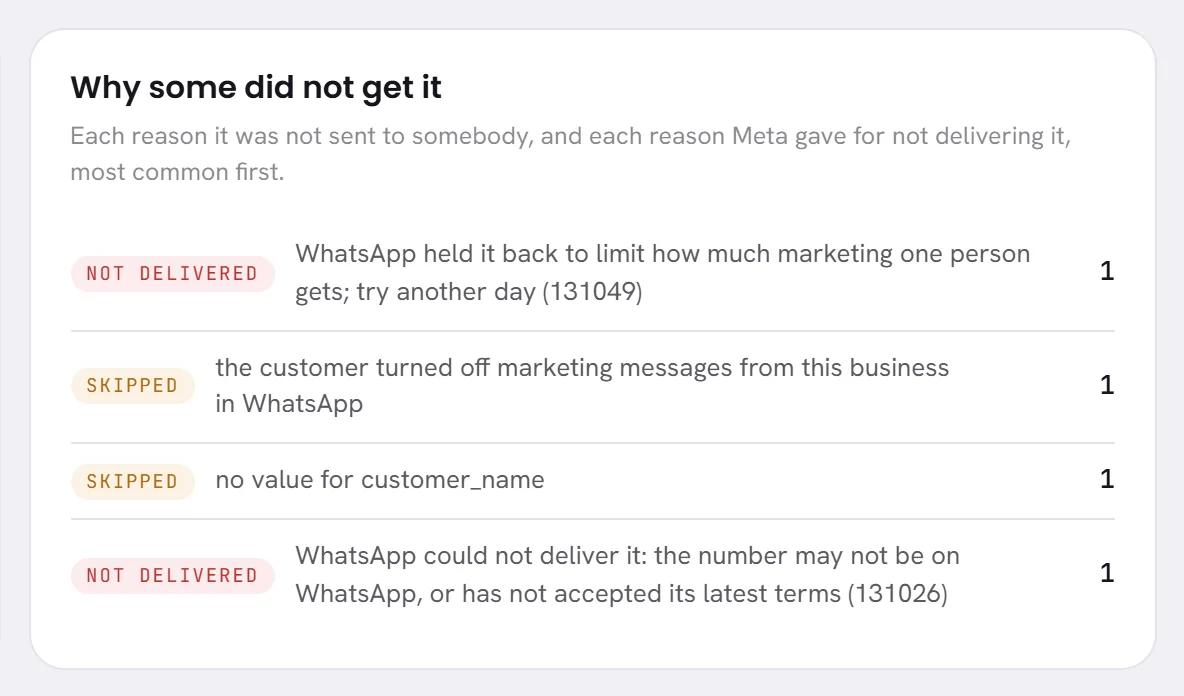
Why some did not get it lists up to ten reasons, the most common first. Each line has a kind, the reason, and how many people it applies to.
| On the screen | What it does |
|---|---|
| Skipped | No message was tried for this person: one of the app’s own checks left them out. |
| Not delivered | A message was tried and refused, or WhatsApp accepted it and reported afterwards that it could not deliver it. |
The reasons are in English, as they were recorded, whatever language you read the app in. When WhatsApp gave the reason, its own code is in brackets at the end: quote it if you write to support. These are the ones you are most likely to meet.
| The page says | What it means, and what to do |
|---|---|
no value for customer_name | Skipped. The contact has nothing in the field that fills that blank; the last word is the blank’s name. Fill the field for those contacts, or use fixed text for that blank. |
the customer turned off marketing messages from this business in WhatsApp | Skipped. The template is a marketing one and this person stopped marketing from you in WhatsApp’s own menu. They still receive your other messages. It is their choice. |
no WhatsApp number or user id to send to | Skipped. The contact has no number the message could go to. Add it in Contacts. |
the template is no longer approved | Skipped. Meta paused or disabled the template while the campaign was running. See Template statuses. |
the contact has opted out | Not delivered. They opted out between launch and their turn. Do not write to them again. |
WhatsApp could not deliver it: the number may not be on WhatsApp, or has not accepted its latest terms (131026) | Not delivered. Check the number with the customer, or remove the contact. |
WhatsApp held it back to limit how much marketing one person gets; try another day (131049) | Not delivered. WhatsApp limits the marketing one person receives from businesses. Nothing is wrong with your number. |
WhatsApp is limiting this number because earlier messages were blocked or reported (131048) | Not delivered. Stop, and read Messaging limits and quality before you send again. |
Meta has paused this template because of low quality (132015) | Not delivered. See Template statuses. |
WhatsApp could not charge this account, so its payment method needs attention | Not delivered. See Add a payment method at Meta. |
not sent: sending was paused | Not delivered. The message waited six hours for your number to be able to send, then gave up. Once the number sends again, try the failed ones again. |
the number it would go from is disconnected; reconnect it in Channels | Not delivered. The campaign’s number was not connected when the message was due. See Reconnect a number. |
WhatsApp never confirmed it went, so it was not sent again in case it did | Not delivered. The message left and no answer came back within ten minutes. It was not sent twice, on purpose. Try the failed ones again. |
Any other reason is WhatsApp’s own sentence, passed on as it came. Messages not sending goes through the commonest causes.
Day by day
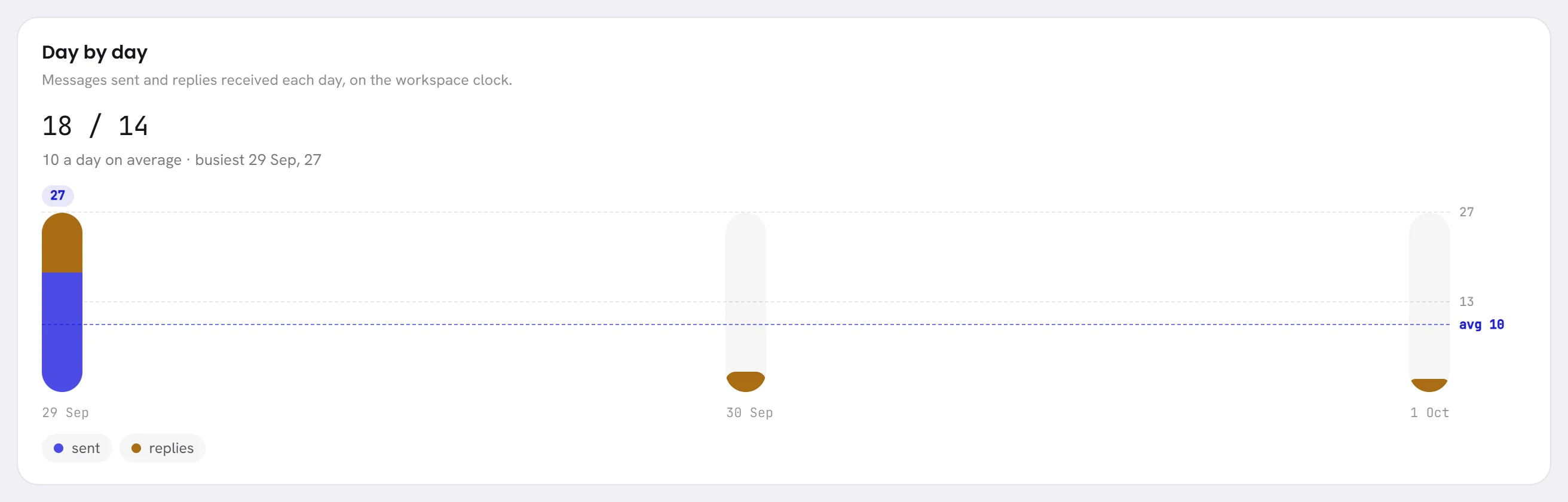
Day by day draws one bar for each day, from the first day the campaign sent anything to the last day something happened, on your workspace’s clock. A bar has two parts: messages sent, and replies received.
- The two numbers above the chart are the totals: messages sent, then replies.
- Under them are the average for a day and the busiest day. Both add messages sent and replies together.
- Rest the pointer on a bar, or tap it, to read that day’s date and figures.
- A campaign that is still being answered months later is drawn for its first 60 days.
- Until something has been sent, the chart’s place says Nothing has been sent yet.
Who it went to
Who it went to lists everybody the campaign was for, 25 to a page: the most recently sent first, and the people never sent to last.
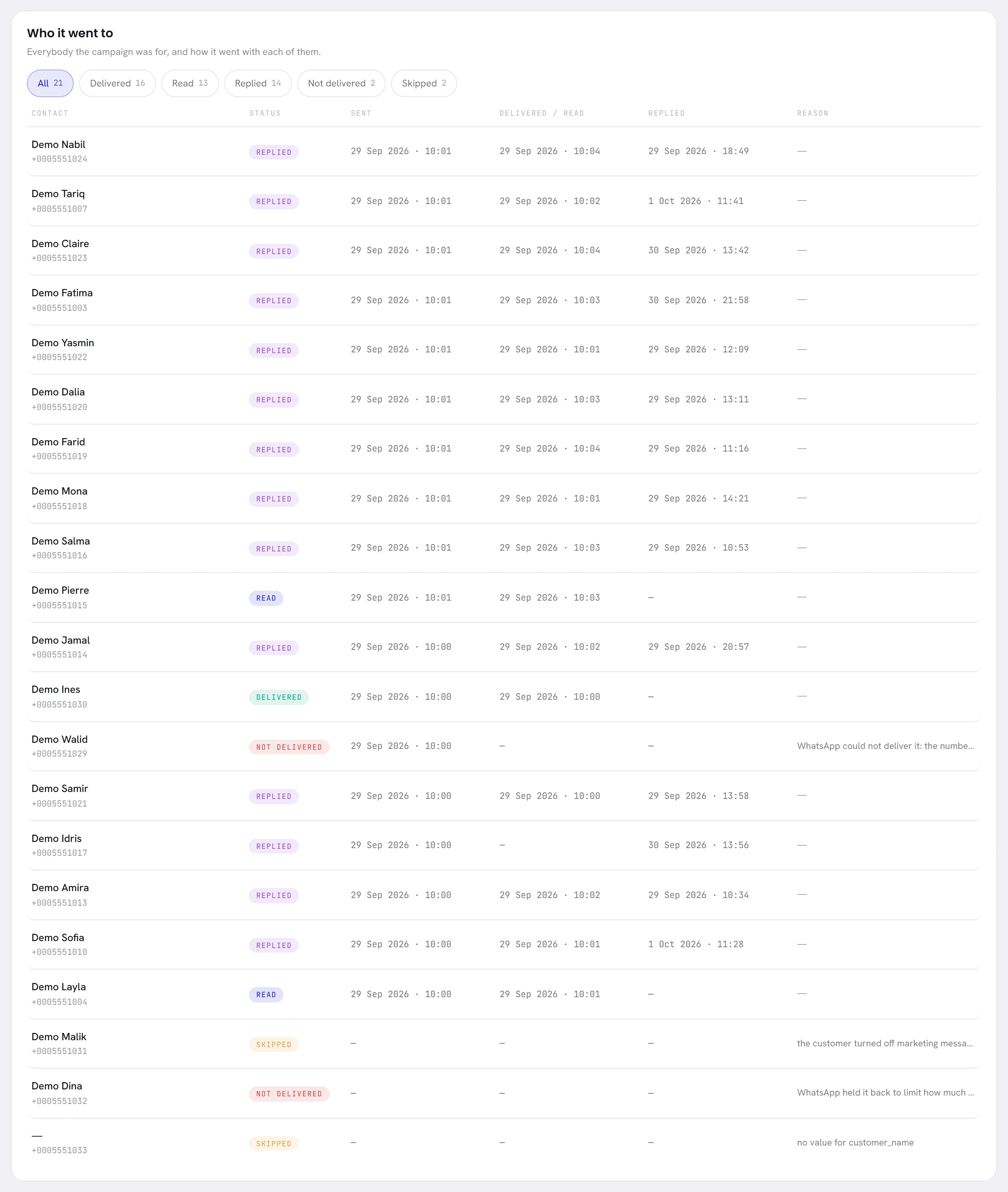
| On the screen | What it does |
|---|---|
| Contact | The person’s name and number. A dash stands for a contact with no name. |
| Status | How far it got with this person: replied, read, delivered, sent, not delivered, skipped or waiting. |
| Sent | When WhatsApp accepted the message. |
| Delivered / read | When it was read or, if it was not, when it was delivered. |
| Replied | When they wrote back. |
| Reason | Why they were skipped or did not get it. A long reason is cut short here: the whole sentence is under Why some did not get it. |
Press one of the buttons above the list to keep one outcome.
They are All, Delivered, Read, Replied, Not delivered, Skipped and Waiting, each with its number. An outcome nobody has is not offered.
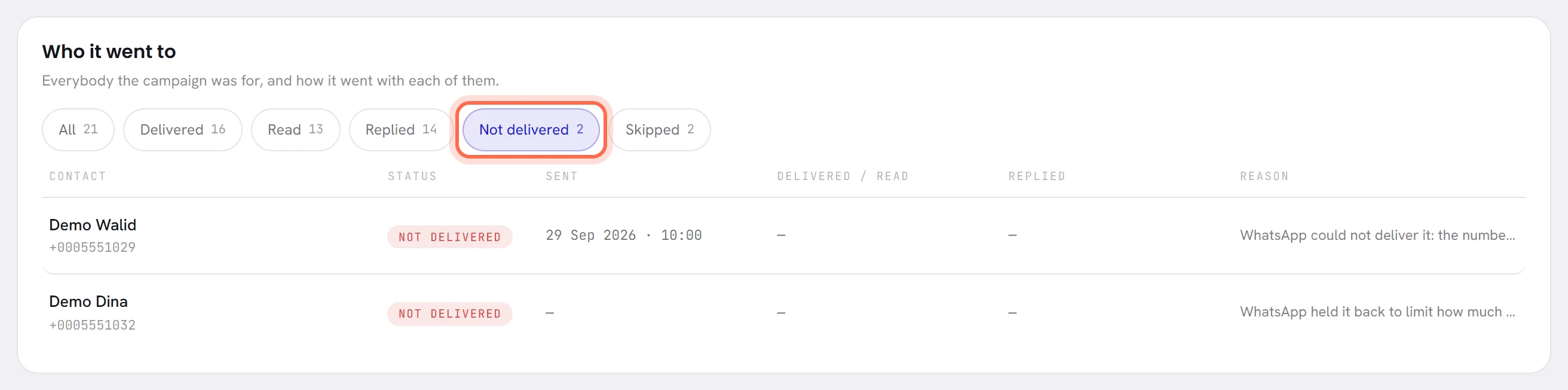
Press All to see everybody again.
The choice is part of the page’s address, so a link to the page keeps it.
The buttons overlap: somebody who read the message is also counted under Delivered. The list cannot be downloaded from this page.
What a good result looks like
No number is good for every business, and this page does not give one. Read a campaign against your own earlier campaigns to the same kind of audience.
- Delivered against sent. A wide gap means numbers that are no longer on WhatsApp. Narrow the list to Not delivered and clean those contacts.
- Skipped. Many people skipped for a missing value means the field is empty for part of your contacts. Fill it, or use fixed text.
- Read. Take it as a floor, not a count: people who switched read receipts off are never reported as having read.
- Replied. It only counts replies within three days, and only when nothing else was sent in between. A message that asks nothing gets few replies, and that is not a failure.
- The reasons. A reason about your number or your template, such as WhatsApp limiting the number or Meta pausing the template, matters more than any percentage. Act on it before the next campaign.
- Opt-outs. People who opt out after a campaign are counted on the Consent tab of Reports. See Consent and refusals.
Good to know
- Anybody whose access includes Campaigns and templates can open a campaign’s results.
- When a campaign is removed from the list, its results page can no longer be opened.
- A cancelled campaign keeps the people it never wrote to as Waiting. They will not be sent to.
- Campaigns launched in a period are also listed on the Campaigns tab of Reports: see Desk and campaign reports.
Questions
Why is the number on the Try again button smaller than Not delivered?
The button only takes the messages that were refused when they were sent. A message WhatsApp accepted and reported later as not delivered is counted under Not delivered but is not tried again.
Why is there no Meta charged figure?
It appears once WhatsApp has put a price on at least one of the campaign’s messages, which usually takes up to a day, and only when all the prices are in one currency.
How can Replied be as high as Read, or higher?
Somebody with read receipts switched off can answer without ever being reported as having read the message.
Can I download the list of recipients?
Not from this page. The download on the Reports screen holds one line for each campaign: see Desk and campaign reports.