What the agent is
Your AI agent answers the customers who write to your WhatsApp number. It replies in a few seconds, at any hour, in the language the customer wrote in, and only from what you taught it. When a conversation needs a person, it hands it to your team and stops writing.
You set it up on AI Agent in the menu: who it is, how it speaks, what it knows and what it may do. Nothing there reaches a customer until you put the agent live.
What it does in a conversation
- It answers each message in one or two short sentences, the way a person writes on WhatsApp.
- It answers in the customer’s own language and dialect, among the languages you allow it.
- It says only what is in its knowledge and in what you wrote about your business. When the answer is not there, it says it does not have that information and offers to help with something else.
- It reads voice notes and pictures. What was said in a voice note, or what a picture shows, reaches it as text, and it answers that.
- It does what you allow besides writing: close a finished conversation, hand it to a person, add tags to the contact, save what the customer said about themselves, send a file, show quick reply buttons or a link button, and follow up when a customer goes quiet.
- It leaves a line in the conversation each time it acts, so the colleague who reads it later sees what happened and why.
Each of these is set on the agent’s own page. Agent profile and instructions covers how it speaks and what it may do, and What your agent knows covers what it answers from.
What it never does
Four rules hold whatever you write in its instructions. The agent’s Profile lists them under Never, whatever the settings.
| On the screen | What it does |
|---|---|
| Answers anyone who asked to stop | A customer who sends a stop word such as STOP is opted out, and the agent does not answer them, not even to say goodbye. See Opt-in and opt-out. |
| Writes on a thread a person has taken | Once a colleague takes a conversation, or the agent hands it over, the agent writes nothing more in it until somebody hands it back. See Assign and hand over. |
| Writes while Meta holds the thread | If Meta’s own assistant is answering a conversation on a number, your agent stays out of it. |
| Sends free-form outside the 24-hour window | The agent only replies to customers who wrote to you, so it always writes inside the 24-hour window. It never opens a conversation: writing first needs a template, sent from the inbox, a campaign or a workflow. |
Three more things it does not do:
- It does not state a figure it cannot find. Every number of four digits or more in a reply is checked against what you gave it. If one is not there, the reply is not sent and the conversation goes to a person.
- It does not answer a message with nothing in it to read. A video, a document, a sticker or a location sent without any text goes to a person, and so does a voice note or a picture that could not be read.
- It does not answer while your AI is paused: when your AI wallet is empty, when a free trial has ended without a plan, or when our team has turned it off. Conversations then go to a person, with the reason written in them.
The list of agents
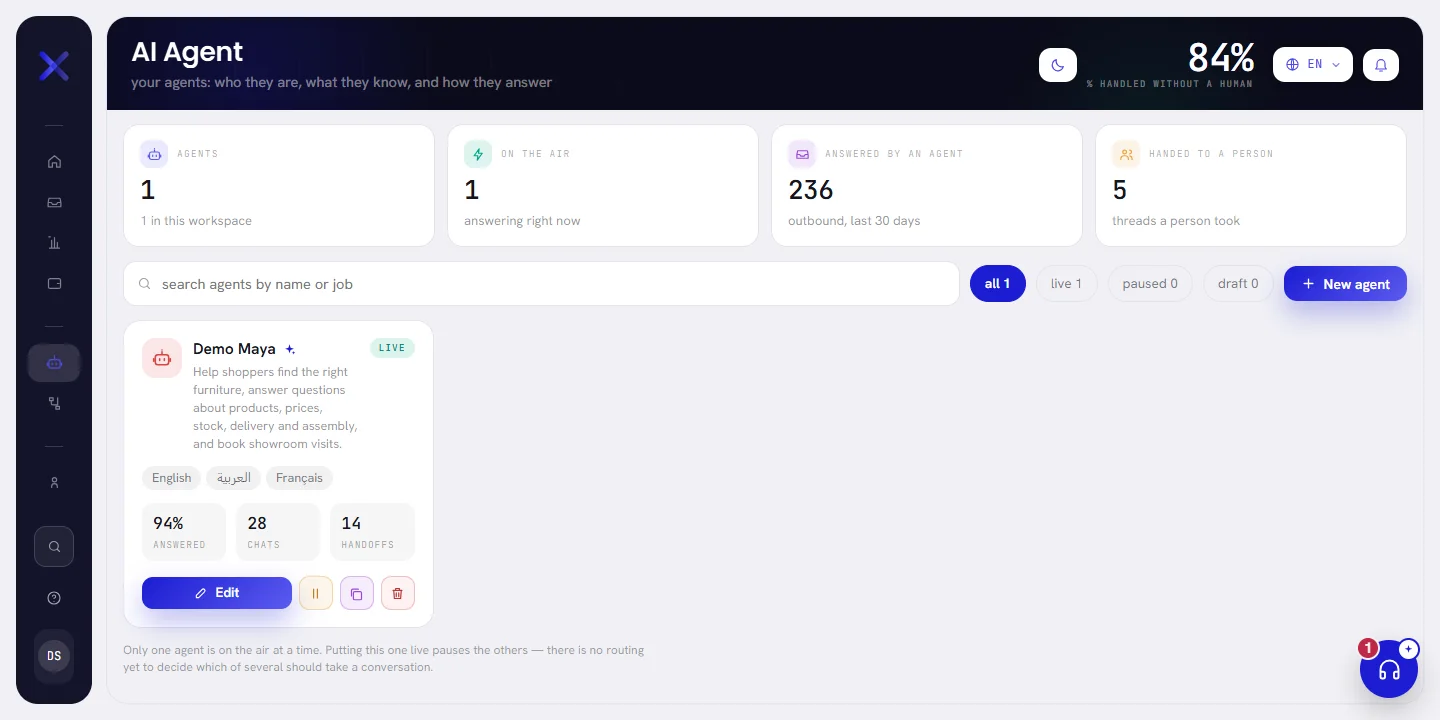
AI Agent opens on the list of your agents. A workspace can hold several, for example one for sales and one for support, but only one answers at a time.
| On the screen | What it does |
|---|---|
| Agents | How many agents the workspace has. |
| On the air | How many are answering right now: none or one. |
| Answered by an agent | The messages your agents sent to customers in the last 30 days. |
| Handed to a person | The conversations assigned to a person that had activity in the last 30 days. |
| Search agents by name or job | Type part of a name or of a description and press Enter. |
| All | Every agent. Each filter shows how many agents it holds. |
| Live | The agent that is answering customers. |
| Paused | Agents that were live and have been stopped. |
| Draft | Agents that have never been put live. |
| New agent | Opens the form that makes an agent. See Create an AI agent. |
Each agent has a card. It carries the agent’s name, its description, a badge with its status, and the languages it may answer in. The live agent’s card pulses gently.
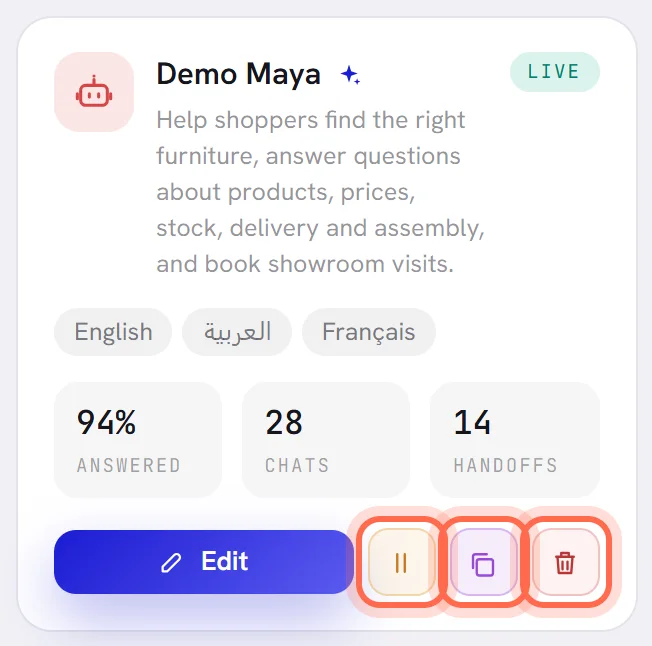
| On the screen | What it does |
|---|---|
| Answered | Of everything it was asked since it was created, the share it answered. A dash until it has been asked something. |
| Chats | The conversations it took part in. |
| Handoffs | The times it handed a conversation to a person. |
| Edit | Opens the agent’s page. |
| Set live | On an agent that is not live: puts it on the air. Any other live agent is paused. |
| Pause | On the live agent: stops it answering. |
| Duplicate | Makes a copy as a draft, named after the original with “copy”, and opens it. The copy has the same profile and its own copy of the knowledge. Skills, version history and figures are not copied. |
| Delete | Deletes the agent, with its knowledge, after you confirm. Conversations it handled are untouched. The live agent cannot be deleted: pause it first. |
The list shows 12 agents a page. A workspace that has none yet reads No agent yet. The first one takes a minute.
An agent’s page
Choose Edit on a card to open the agent. Its page has three columns: the agent and its pages on one side, the page you chose in the middle, and the preview on the other side.
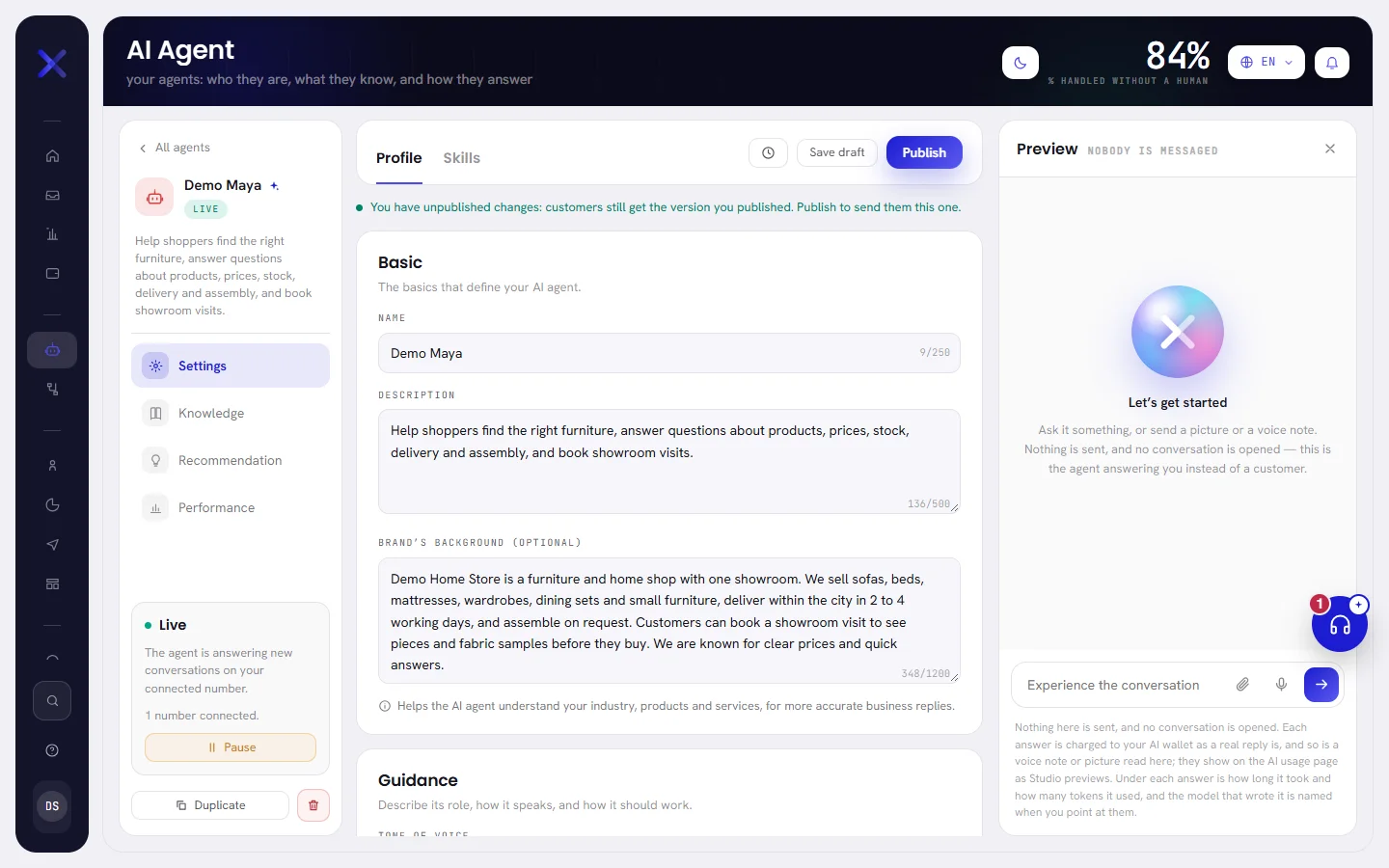
| Page | What it holds | Read |
|---|---|---|
| Settings, tab Profile | Its name and description, your brand’s background, its tone, languages and instructions, and the actions it may take. | Agent profile and instructions |
| Settings, tab Skills | Ways of handling particular situations, each with a start trigger and steps. | Agent skills |
| Knowledge | The documents, web pages, questions and answers it answers from, and the files it may send. | What your agent knows |
| Recommendation | Questions customers asked that it could not answer, each with a way to add the answer. | Agent performance |
| Performance | What it answered, what it handed to a person, and why. | Agent performance |
| Preview | A test chat with the agent. Nothing is sent to anybody. | Test your agent |
| Version history | Every saved draft, and the version customers get. | Drafts and versions |
The side column also says whether the agent is on the air, and holds the buttons that change that.
| On the screen | What it does |
|---|---|
| All agents | Goes back to the list. |
| Not deployed | The status of a draft: the agent answers nothing until it is deployed. |
| Live | The agent is answering new conversations on your connected number. |
| Paused | The agent is not answering. Conversations a person owns are untouched. |
| Deploy the agent | Puts the agent live. Shown on a draft and on a paused agent. |
| Pause | Stops the live agent answering. |
| Duplicate | Copies the agent as a draft. |
| Delete | Deletes the agent, after you confirm. |
The agent and your WhatsApp numbers
An agent is not tied to one number. The agent that is live answers on every WhatsApp number connected to your workspace, and replies from the number the customer wrote to. On Channels, each number’s card says who answers it under Answered by.
Under its status, the side column of an agent’s page says how many numbers are connected, for example 1 number connected. With none it says No number connected yet. and the agent cannot go live. See Connect a WhatsApp number.
What it uses
Each reply the agent sends uses AI usage, and so does each voice note or picture it reads. Answers in the preview count the same way. AI usage shows what was used and what is left in your AI wallet: see AI usage overview.
On WhatsApp’s side, the agent’s replies are service messages, sent inside the 24-hour window. What WhatsApp charges explains how Meta counts them.
Languages
The agent can answer in English, Arabic, French and Spanish. You tick the ones it may use on its Profile, among those your plan includes: Plan & billing shows what your plan has.
It reads which language a customer wrote in and answers in that one, whatever language your team reads the app in. For a customer who writes in a language that is not on its list, you choose a fallback language or leave the agent to decide.
Good to know
- Admins and managers can open AI Agent. Other members see it only if an admin gives them access to the AI agent: see Roles and access.
- Every plan includes the AI agent. The languages it may answer in depend on your plan.
- The agent answers whenever it is live. There are no working hours to set: to stop it, pause it.
- A customer who writes into a closed conversation opens it again, for the agent.
Questions
Can two agents answer at the same time?
No. Only one agent is live at a time, on all your numbers. Keep the others as drafts or paused, and put live the one you want.
What happens to messages when no agent is live?
Nothing answers them automatically. They arrive in the Inbox, still listed under AI agent, and wait there. Open a conversation and choose Take over to answer it yourself.
Does the agent tell customers it is an AI?
It answers under the name you gave it and does not present itself as an AI. If a customer asks directly, it says so.
Does it keep answering after it hands a conversation over?
No. From then on the conversation belongs to your team. The agent comes back only when somebody chooses Hand back in the inbox, or when the conversation was closed and the customer writes again.