What a segment is
A segment is a saved answer to the question “who should get this message?”. You describe the group once, give it a name, and choose it each time you create a campaign.
There are two kinds:
- By rules. You say what the contacts have in common: a tag, a language, having written to you in the last 30 days. The segment keeps itself up to date: contacts join and leave by themselves as they start or stop meeting the rules.
- A fixed list. You tick the contacts one by one. The list only changes when you change it.
The number a segment shows is always the number of contacts who can be messaged: the ones in the segment who agreed to hear from you and have not opted out. This is the number a campaign acts on. See Consent and opt-outs.
What segments are for
- Campaigns. A campaign sends one template to one segment. You choose the segment in the campaign’s Audience step, so you need at least one segment before your first campaign. See Create a campaign.
- Workflows do not use saved segments. A workflow’s trigger has its own Audience, written with the same kind of rules. See Workflow triggers and steps.
The Segments screen
Open Segments in the menu. Four figures about your whole workspace come first, then the search and the filters, then one card for each segment, in order of name and 24 to a page.
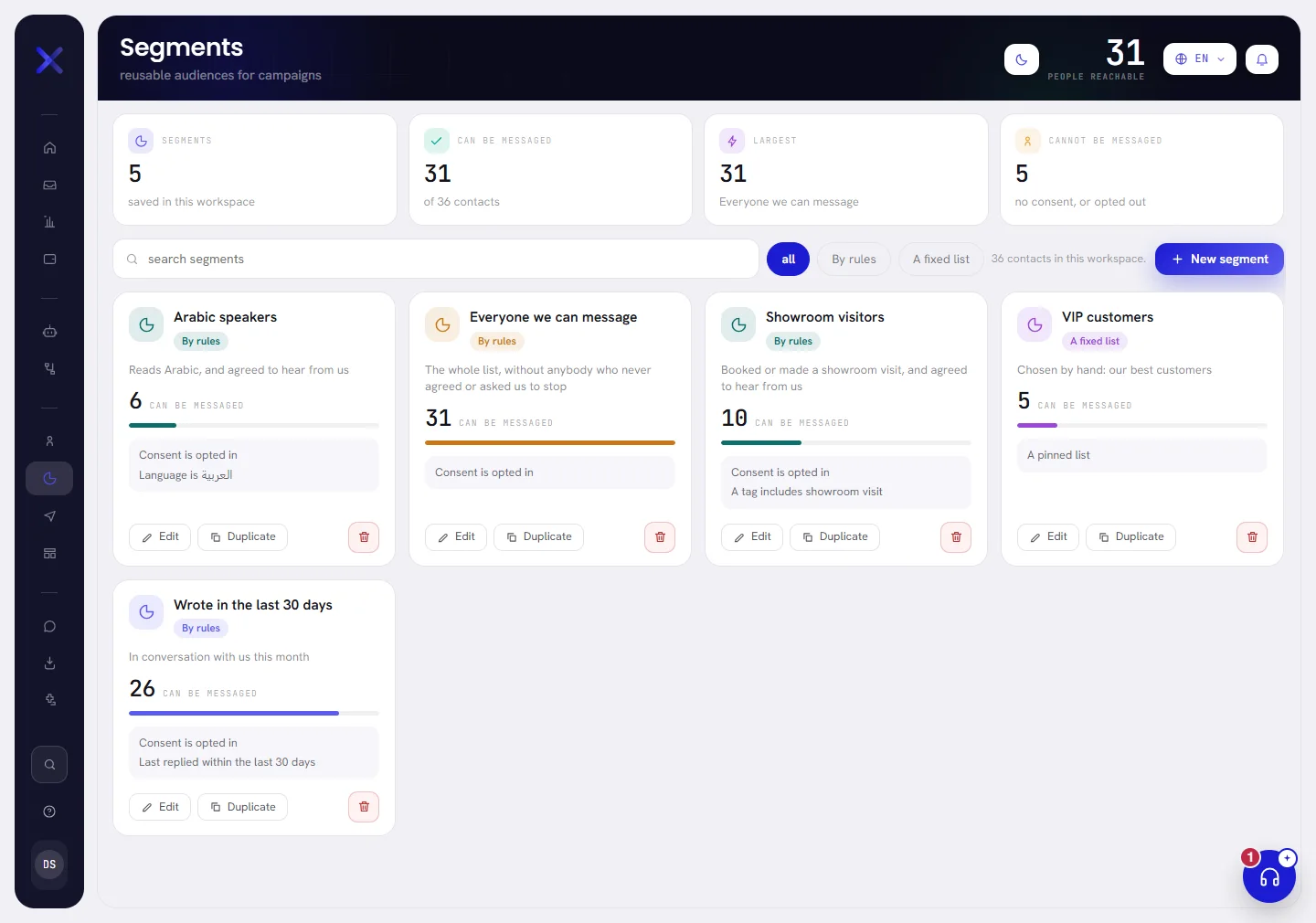
| On the screen | What it does |
|---|---|
| Segments | How many segments your workspace has. |
| Can be messaged | How many of all your contacts agreed to hear from you and have not opted out. The line under it gives the total number of contacts. |
| Largest | The size of your biggest segment, counted in contacts who can be messaged, and its name. |
| Cannot be messaged | Contacts with no consent recorded, or who opted out. No segment can send to them. |
| People reachable | The figure at the top right of the screen: the same number as Can be messaged. |
Find a segment
| On the screen | What it does |
|---|---|
| search segments | Looks in the names and descriptions of your segments. Type, then press Enter. |
| all | Shows both kinds. The buttons By rules and A fixed list beside it show one kind only. |
| 36 contacts in this workspace. | How many contacts you have in all, whatever their consent. |
| New segment | Opens the window to build a segment. See Build a segment. |
When nothing matches, the screen says No segment matches that. Before your first segment it says No segments yet. The first one takes a minute.
What a card shows
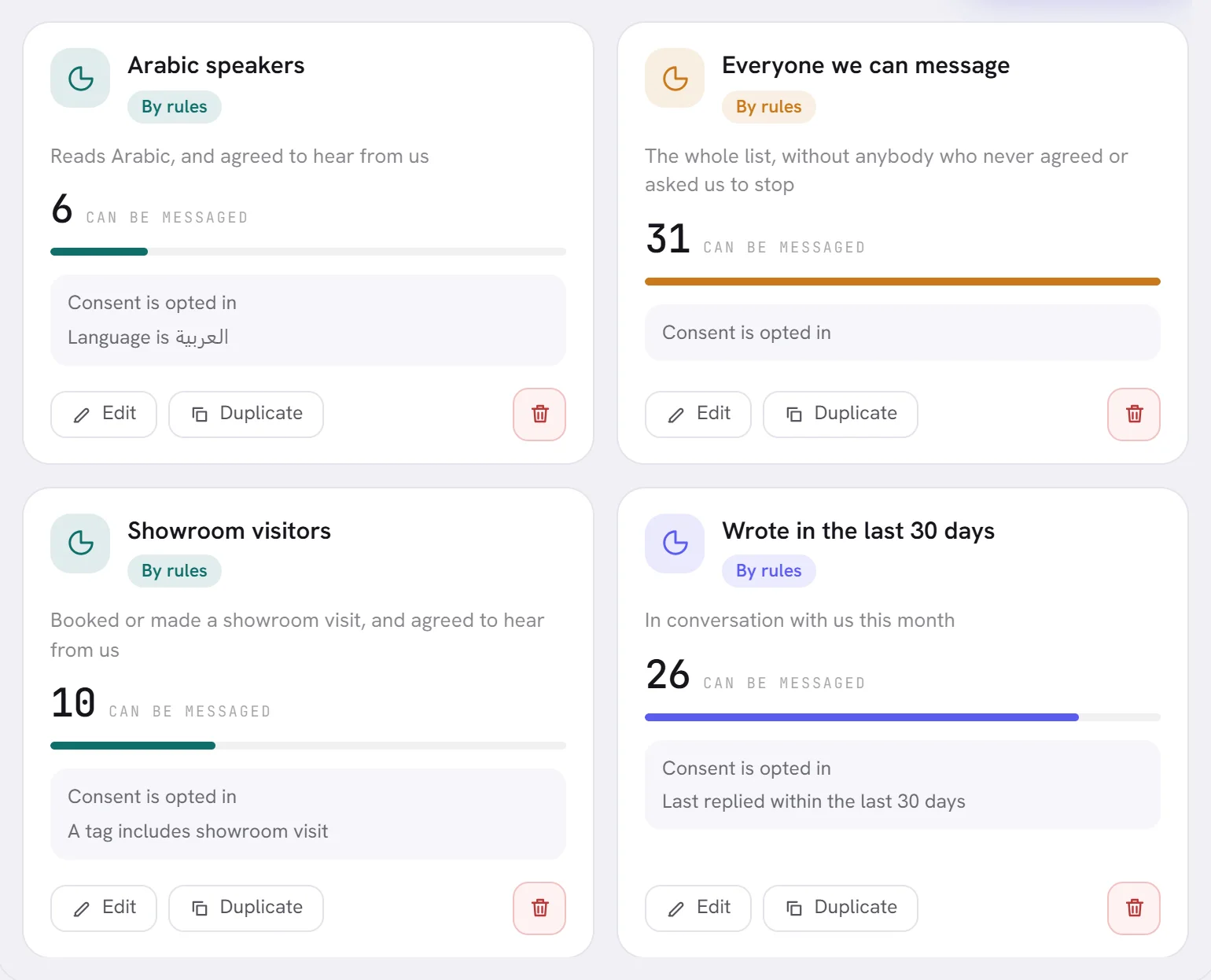
A card starts with the segment’s name, its kind (By rules or A fixed list) and its description, if you gave it one.
| On the screen | What it does |
|---|---|
| Can be messaged | The large number: the contacts in this segment a campaign can send to today. The bar under it compares the segment with your largest one. |
| 4 match but cannot be messaged — no consent, or they asked us to stop. | Shown only when some of the segment’s contacts cannot be messaged, with how many. |
| No rules yet, so this is the whole list. | Shown when a segment has no rules: every contact is in it. |
| A pinned list | Shown on a fixed list, which has no rules. |
| +2 more | A card spells out the first two rules in words. This says how many more there are. |
| Edit | Opens the segment in its window. Clicking the name does the same. |
| Duplicate | Makes a copy of the segment, to adjust without touching the first one. |
| Delete | The bin. Deletes the segment, after asking. |
Editing, duplicating and deleting are explained in Build a segment.
Good to know
- Who can open it. Admins and managers. An admin can give this access to one more person, or take it away: it is the Contacts and segments box in that person’s access. See Roles and access.
- Your plan. Segments are part of every plan.
- Deleting a segment never deletes its contacts.
A segment shows 0. Why?
Either nobody meets its rules, or the contacts who do cannot be messaged. Press Edit: the window shows how many match beside how many can be messaged. Contacts you import arrive without consent, which is the usual reason. See Consent and opt-outs.
Can I see everybody who is in a segment?
The segment’s window shows the count and the six most recent contacts it reaches. There is no full list on this screen.
Is the count on the card the number a campaign will send to?
It is the number that can be messaged today. A campaign can still send to fewer: see why.