The Consent tab
Open Reports and choose Consent. The panel Permission to message shows how the number of people you may write to first has moved in the period. A business may only write first to people who agreed to it: see Opt-in and opt-out.
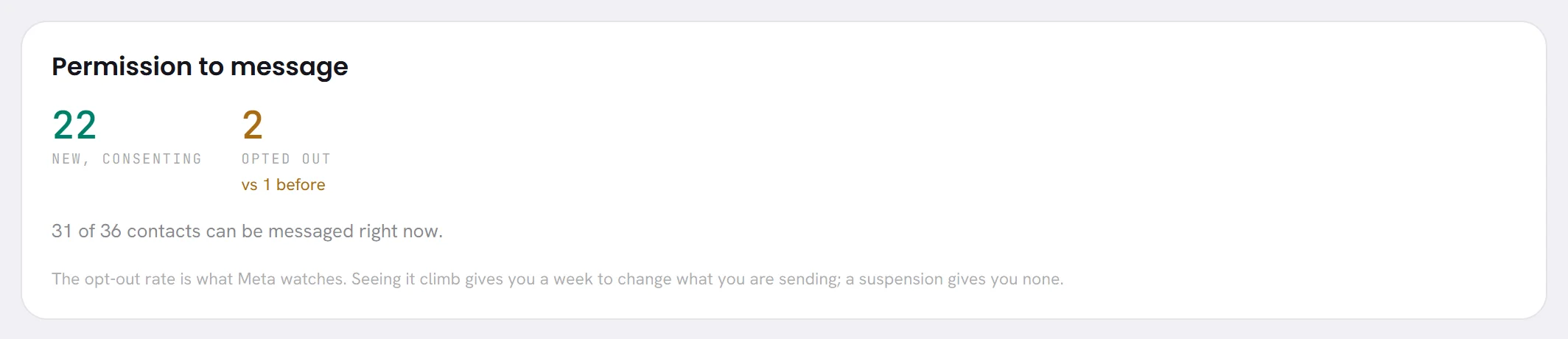
| On the screen | What it does |
|---|---|
| New, consenting | Contacts added in the period who agree to be messaged. |
| Opted out | Contacts who opted out in the period. Under it is the figure for the period before, as vs 1 before; it turns amber when more people opted out than before. |
Under the two figures, a sentence gives today’s position, whatever the period: 31 of 36 contacts can be messaged right now. A contact can be messaged when they agreed and have not opted out. Segments and campaigns use the same count: see who is counted.
How consent and opt-outs are recorded for a contact is in Consent and opt-outs.
How consent is counted
- New, consenting goes by the day the contact was added, and counts the ones who agree today. Somebody added earlier who agrees later is not in it, and neither is somebody added in the period who has opted out since.
- Opted out goes by the day of the opt-out.
- The comparison is with the same number of days immediately before.
- The sentence about who can be messaged right now does not follow the period: it is always today’s count, out of all your contacts.
What moves the consent figures
- Adding contacts who agreed to be messaged raises New, consenting. See Import contacts.
- A campaign people did not expect raises Opted out. Compare the days with the dates of your campaigns.
- Somebody who has opted out is left out of every campaign, so each opt-out also lowers what your segments can reach.
The panel’s own note is the reason to watch this tab: the opt-out rate is what Meta watches, and seeing it climb leaves you time to change what you send. See Messaging limits and quality.
Why messages did not send
The reasons are on the Delivery tab, under the bars, in the panel Why messages did not send. It takes the messages of the period that were never sent and groups them by the reason recorded for each.

- Up to eight reasons are listed, the most common first, each with how many messages it stopped.
- A reason is the exact sentence recorded when the message was stopped. It is in English whatever language you read the app in, so you can quote it as it is to support.
- When WhatsApp gave the reason, its own code is in brackets at the end.
- When nothing was stopped, the panel says Nothing was refused in this period.
What is refused before sending, and why
Before a message leaves, the app checks that it may go. A message that fails a check is never handed to WhatsApp, so it costs nothing.
| The panel says | What happened |
|---|---|
the contact has opted out | A message was written for somebody who has opted out, or who never agreed. Do not write to them again. |
the service window has closed | A reply in your own words was written more than 24 hours after the customer last wrote. Send a template instead: see The 24-hour window. |
the thread changed hands before this could send | The agent’s reply was ready when a person took the conversation, or a person’s reply when it went back to the agent. It was dropped so that the customer does not hear two voices. |
the customer turned off marketing messages from this business in WhatsApp | A marketing template was written for somebody who stopped marketing from you in WhatsApp’s own menu. They still receive your other messages. |
no WhatsApp number or user id to send to | The contact has no number the message could go to. |
this template needs an image or file and none was given | The template was approved with an image, video or document header, and the send had no file for it. |
the template is not approved (paused) | The template could not be used when the message was due. The word in brackets is its status: see Template statuses. |
the number it would go from is disconnected; reconnect it in Channels | Your number was not connected. The word after “is” is its state: see Reconnect a number. |
WhatsApp could not charge this account, so its payment method needs attention | Your number cannot send until the payment method on your WhatsApp account is fixed: see Add a payment method at Meta. |
not sent: payment issue, the 24-hour window has closed | A reply waited for that payment method to be fixed, and the customer’s 24 hours ran out meanwhile. |
A reason that ends with a code in brackets came from WhatsApp itself. The commonest are listed in Campaign results, and Messages not sending goes through what to do about each.
Good to know
- Consent and Delivery are in every plan, and open for anybody whose access includes Reports.
- People a campaign skipped are not in the list of reasons: no message was written for them. They are on that campaign’s own results page.
- What your messages cost is on the Overview tab: see What WhatsApp cost.
Questions
Why do the reasons add up to less than never sent?
Only the eight commonest reasons are listed, and a message stopped with no reason recorded is not in the list.
Why is a reason in English when I read the app in another language?
Reasons are kept exactly as they were recorded, so that the same sentence can be found again and quoted to support.
Does New, consenting go down when somebody opts out?
Only when that person was added in the same period: the figure counts the contacts added in the period who agree today. The opt-out is then counted under Opted out as well.