How a top-up works
The AI wallet is topped up by bank transfer, in three moves.
- You ask for a top-up on the AI usage screen, and get a reference for it.
- You transfer the amount to our bank account, with that reference on the transfer.
- Somebody on our team confirms the transfer when it arrives, usually within one or two working days. The money is added to your wallet and a receipt is issued.
Ask for a top-up
Open AI usage and press Top up on the balance card.
It takes you down the screen to Top up by bank transfer.

Type the amount in Amount.
The amount is in your wallet’s currency, written before the box. The line under the box gives the smallest amount you can ask for, which depends on your plan.
Type a plain number, such as
50or120.50. A comma works as the decimal mark too.When VAT applies, a second line under the box says so and gives the rate: you transfer the amount plus VAT, and the wallet receives the amount.
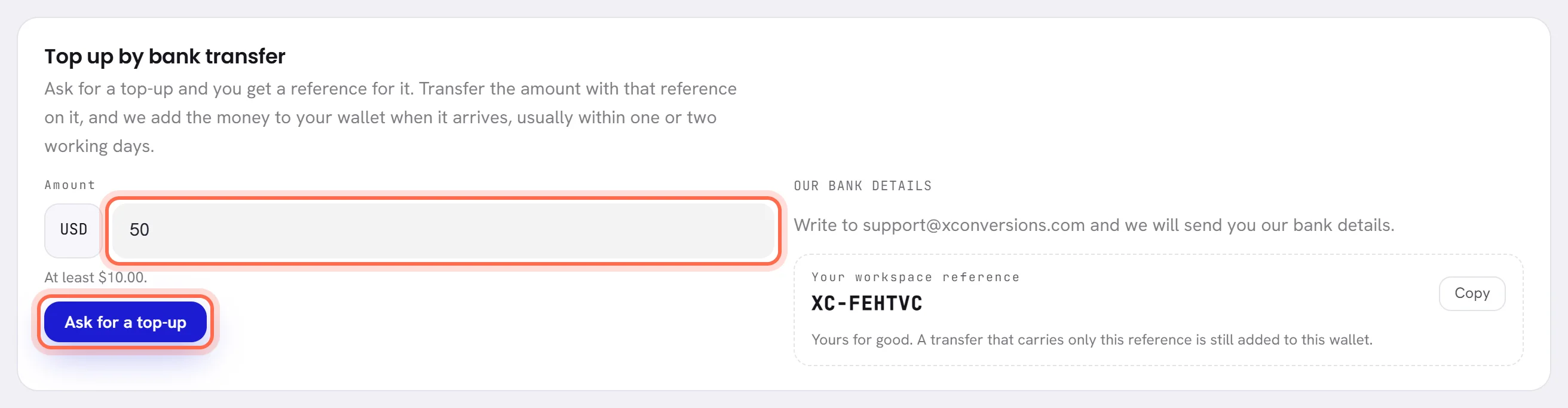
Press Ask for a top-up.
A message, Top-up requested, stays on the screen until you close it. It gives the reference to put on the transfer, such as
XC-3F7K2Q-0042, and the amount to transfer when VAT is added.The request is now the first line of Top-ups, marked Waiting for payment.
Pay by bank transfer
In your bank, start a transfer to the account under Our bank details.
The card lists what your bank asks for: Account name, Bank, IBAN, SWIFT / BIC or Account number. If the card asks you to write to us instead, do that and we send you the details.
Enter the amount you asked for.
When VAT is added, the request’s line in Top-ups gives the amount to transfer, VAT included.
Put the top-up’s reference in the transfer’s reference or description.
It is the first thing written on the request’s line. The reference is how we match the transfer to your wallet.
Send the transfer.
There is nothing more to do on the screen. We add the money when the transfer arrives, usually within one or two working days.
Your workspace reference

Your workspace reference is on the same card: XC- and six letters and digits. It belongs to your workspace for good and never changes.
- A transfer that carries only this reference is still added to your wallet, so you can pay without asking first. It then shows in Top-ups as a bank transfer with the day it arrived, already Received.
- A top-up’s own reference is this one followed by the request’s number, for example
XC-3F7K2Q-0042. - Copy copies it.
- The same reference goes on the transfer when you pay for a plan: see Choose or change a plan.
After you pay
When the transfer reaches our account, somebody on our team marks the top-up as received, with the amount that arrived and the day it arrived. Then:
- The wallet is credited with what arrived. When VAT is added on top, the VAT is taken off first.
- The request’s line turns to Received and says how much was added, and when.
- A receipt is issued. Its number, View and Download appear on the line: see Receipts and wallet history.
- The workspace’s owner is sent an email with the amount, the new balance and the receipt.
- The bell tells the people who see the wallet that the amount was added.
- If the balance was low, the banner goes. If the AI was paused, your agent answers again.
A request that is waiting, and withdrawing it
A request stays Waiting for payment until we confirm its transfer, or until it is closed. Several can wait at once.
To withdraw a request you will not pay, press Cancel on its line.
It is withdrawn at once, with no question asked, and the line turns to Cancelled. No money moves.

A request that was not credited

When our team cannot credit a request, for example because no transfer arrived, or it did not arrive as asked, they close it. The line turns red, is marked Not credited, and gives the reason in their own words after Why:.
Nothing was added to your wallet. The owner is sent an email with the reason, and the bell shows it to the people who see the wallet.
If you have not paid, ask for a new top-up. If you have paid, answer that email or write to support with your bank’s confirmation.
If the form refuses
| What the screen tells you | What to do |
|---|---|
| The smallest top-up is the amount it names. | Ask for at least the amount written under the box. |
| Enter the amount as a number. | Type digits only, with no more decimals than your currency has: 50, not 50 dollars. |
| Enter an amount above zero. | Type an amount. |
| Top-ups in your currency open once today’s exchange rate is in. | Try again later the same day. |
| A free trial has its AI credit and no more. | Choose a plan first: see Choose or change a plan. |
| The top-up is no longer waiting for payment. | It was received or closed while your screen was open. Reload the screen to see it as it is. |
Good to know
- Who can top up: people whose access includes The workspace and billing. The others do not see the form.
- Top-ups are paid by bank transfer.
- The wallet has one currency, fixed on the day it opened. A top-up is always in that currency.
- Asking for a top-up and withdrawing one are both written in the activity log.
Questions
How long does a top-up take?
We add it when the transfer arrives in our account, usually within one or two working days.
I transferred a different amount from the one I asked for.
What arrives is what is added to your wallet, whatever the request said.
I forgot to put the reference on the transfer.
Write to support with your bank’s confirmation and your workspace reference, so we can find the transfer.
Can I top up during the free trial?
No. A trial has its free AI credit and no more. Choose a plan, and you can top up from then on.