What waits for you
An app with Launch requests ticked can ask for the things only a person may do. Nothing happens until an org admin approves, in xconversions.
| The request | What approving does |
|---|---|
| Launch a campaign | Launches the campaign draft, as if you had pressed the launch button yourself: it is sent, or scheduled for the time it was given. |
| Publish an AI agent | Publishes a live agent’s saved changes, or puts a draft agent live. Customers are answered by it from then on. |
| Enable a workflow | Switches the workflow on. It starts running at once. |
| Add knowledge | Adds a text, a web address, or a question and its answer to what a live agent knows. |
| Change knowledge | Changes a question and its answer that a live agent knows. |
| Remove knowledge | Removes something a live agent knows. It cannot be undone. |
A request waits 24 hours. After that it has expired and nothing happened. The app is told so when it asks again.
Where you are told
While a request waits, a notice at the top of every screen says so, and so does the bell. Review on the notice opens Connected apps at Waiting for your approval.

Read the card
Each request is a card. It says which app asks and for what, who connected the app, when it asked, and until when the request waits. Then it says exactly what approving would do, read from the thing itself at that moment.
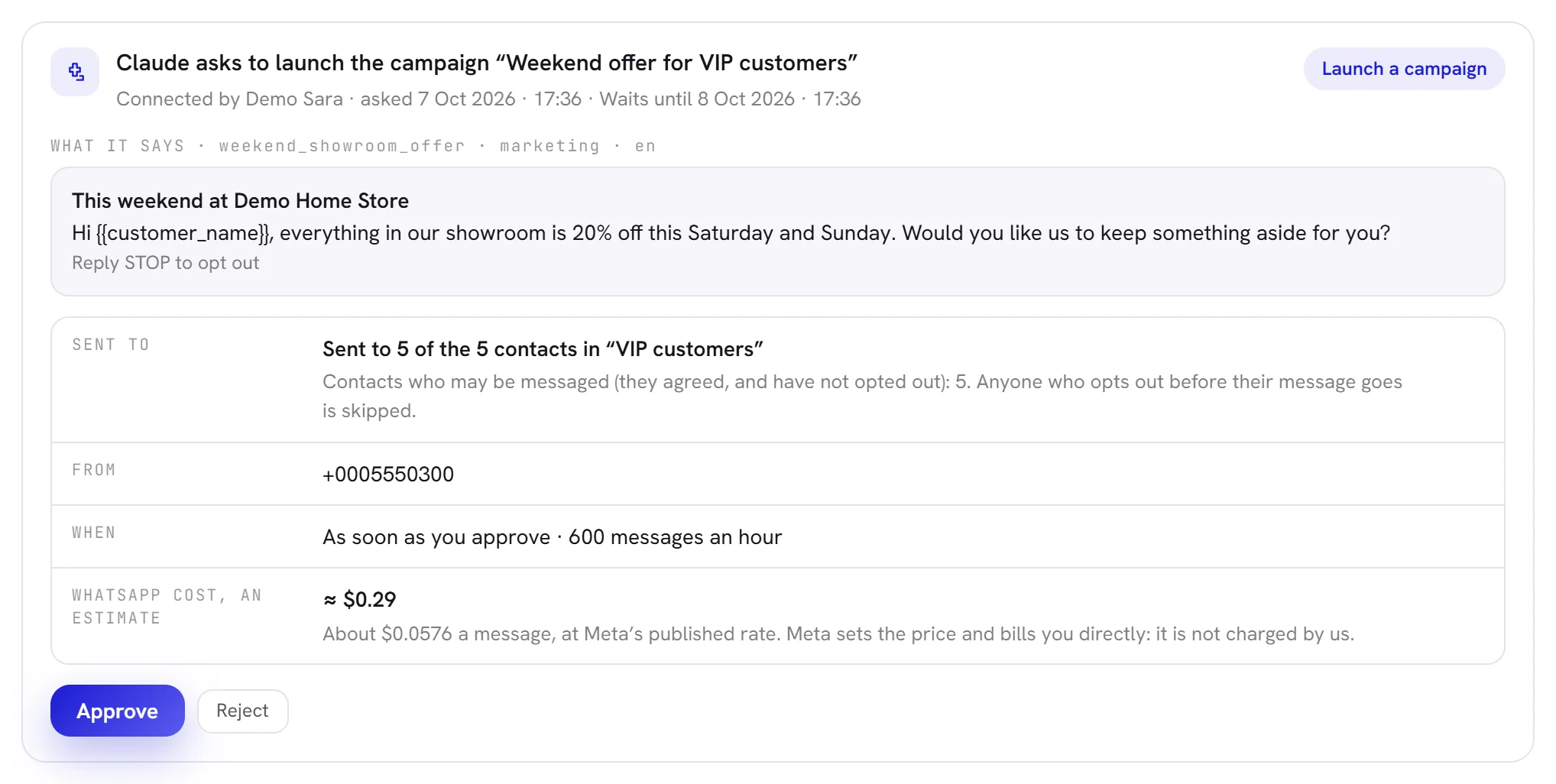
| The request is about | What the card shows |
|---|---|
| A campaign | The template’s own words, how many contacts it goes to and why the others are skipped, the number it is sent from, when, and an estimate of what WhatsApp is likely to cost. Meta sets that price and bills you directly. |
| An AI agent that is live | Every setting that differs from what answers customers now: as it is live, and as it would be after you approve. |
| An AI agent that is not live | That approving puts it live, which agent it takes the place of, and what it knows. What a connected app added is shown whole, with the app and the day. |
| A workflow | What starts it, how many blocks follow, and the templates it sends. |
| What a live agent knows | Every word that would be added, or the web address and how much of the site is read, or the question and its answer. For a change: as they are now, and as they would be. For a removal: the item, and how it begins. |
Approve or reject
Open Settings, then Connected apps.
Or press Review on the notice.
Read the card under Waiting for your approval.
Press Approve, and confirm.
A pop-up says once more what happens. The action is then taken as you, exactly as if you had done it on its own screen, and everything that screen checks is still checked.
Or press Reject, and confirm.
Nothing happens, and the app is told no. The screen says Rejected. Nothing was done.
When something stands in the way, the card says It cannot be approved as it stands: and lists why, in the words of the screen that would refuse it: a campaign whose template is no longer approved, for example. Put it right, or reject the request.
Decided lately
On the same tab, Decided lately keeps what apps asked for and how it ended: Approved or Rejected, with who decided, or Expired.
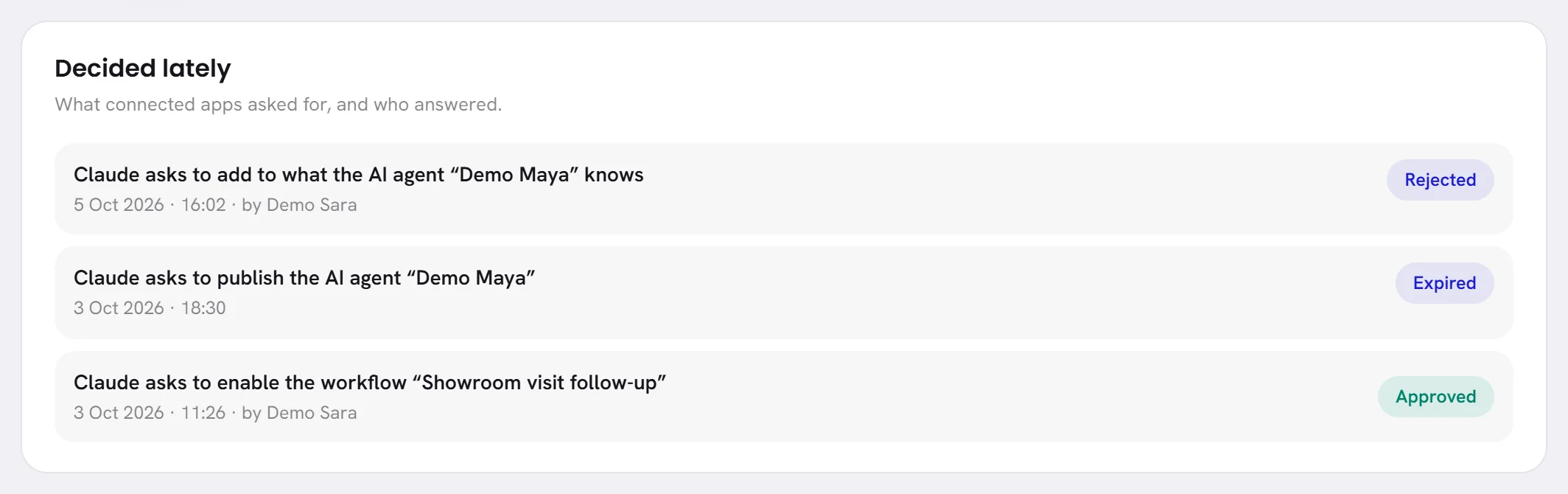
Who approved or rejected what is also written in the Activity log, under their own name.
Good to know
- Only an org admin approves or rejects. It does not have to be the admin who connected the app.
- Asking twice is one request.
- An app is told when there is nothing to ask for: a campaign with no approved template or nobody to send to, an agent with nothing new, a workflow that is not ready.
- A text an app adds to what an agent knows is at most 50,000 characters, so that a person can read all of it. Ten requests about knowledge can wait for one agent at a time.
- Disconnecting an app rejects everything it had asked for that was still waiting.